Slack x Plane: Turn conversations into trackable work
Create, link, and update Plane work items directly from Slack. Keep conversations and execution in sync without manual handoffs or lost context.
Create, link, and update Plane work items directly from Slack. Keep conversations and execution in sync without manual handoffs or lost context.
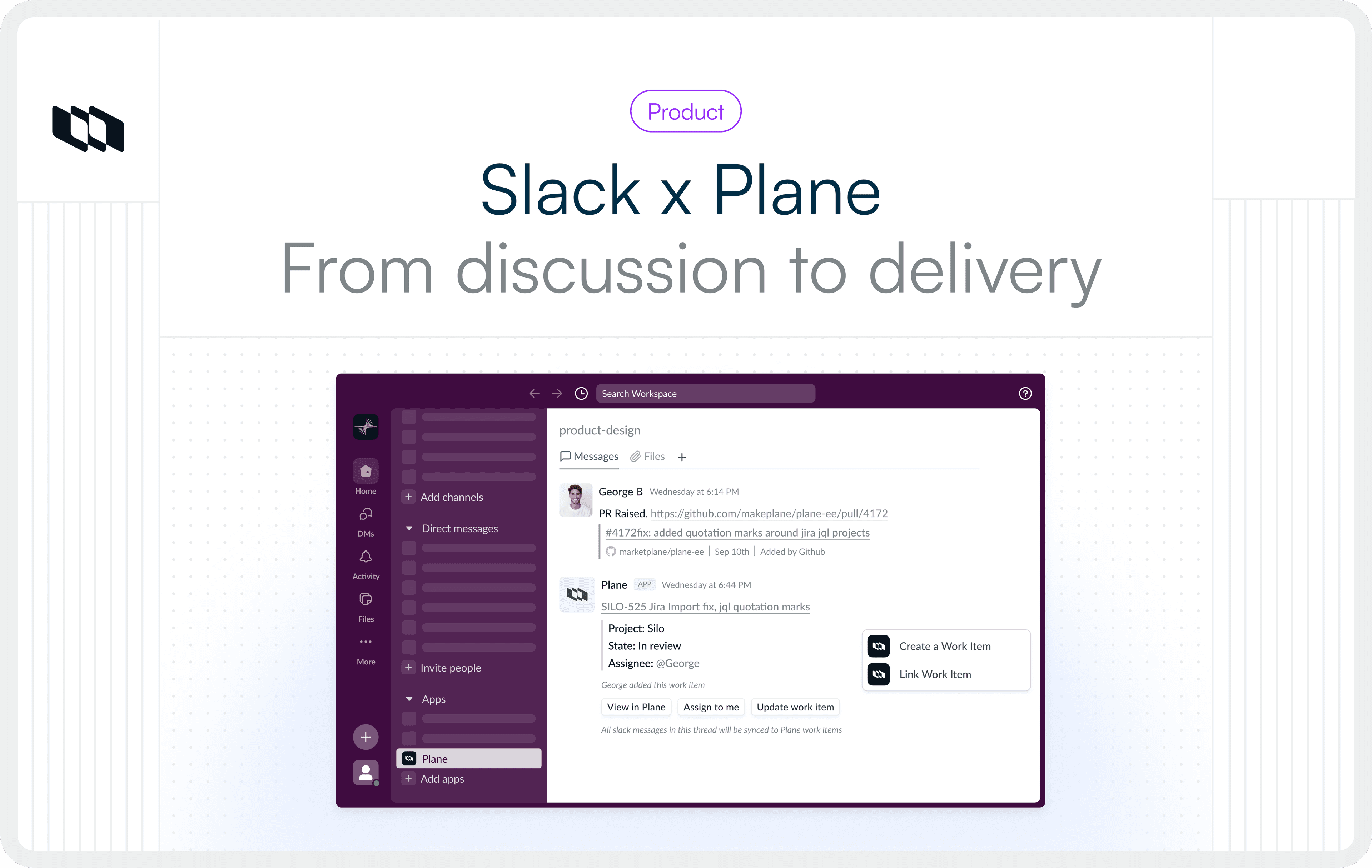
Most work begins as conversation before it becomes trackable. The problem? Those conversations don't naturally become tracked work. Someone has to remember to log it, establish context, and hope nothing was lost in translation.
Plane's Slack integration lets you create work items, update status, and track progress directly from Slack, then switch to Plane to continue managing your work there.
Here's how it works.
Create fully structured work items from Slack
When a Slack message needs to become work, turn it into a Plane work item while the conversation is happening. The creation experience mirrors Plane itself—work item type, required fields, ownership, priority—so work enters your system fully formed. Share a work item link and it expands into a card-like view showing full details. Quick edits work from the sidebar, without leaving Slack.
Most integrations let you create placeholder items that need cleanup later. Plane enforces your project schema at creation, so work is defined correctly the first time.
Create work via @Plane in plain language
For faster entry, invoke @plane command directly in Slack with the same structure through a lighter interaction.
Plane AI lets you create and manage work in plain language. Describe what needs to happen—create a bug, set priority, assign ownership—and Plane translates it into structured work. Useful for incidents, support escalations, or mid-release discoveries where filling out forms would slow things down.
Keep threads and work items synced
Enable thread sync to keep Slack conversations and Plane work items connected bidirectionally. Updates from Plane surface back in the thread automatically.
Link existing Plane work to a Slack conversation
Work doesn't always start in Slack. Sometimes it's already tracked in Plane, but discussion is happening elsewhere—support, engineering, product, leadership channels.
Link any Plane work item directly to a Slack thread. Updates from Plane appear in Slack automatically. Status changes, comments, and resolutions show up where the conversation is happening.
A customer-reported bug might be discussed in #customer-support, #engineering, and #product. Link the same Plane work item to each thread so everyone sees progress in their own context.
Sync a Plane project to a Slack channel
Connect entire Plane projects to Slack channels so updates flow automatically.
An engineering team connects their sprint project to #engineering so progress surfaces where they coordinate. Support links their bug tracker to #customer-issues, keeping triage visible. Product shares roadmap progress in #leadership-updates without flooding the channel.
The channel stays conversational, but updates reflect Plane's actual state of work.
Most teams choose between conversational Slack or tracked work. Plane gives you both—conversation becomes structured work without context-switching or manual translation. Work created from Slack enters fully formed. Conversations and work items stay connected. Your project schema is enforced at creation, so what shows up in Plane matches what your team discussed in Slack.
If your team lives in Slack, this integration ensures momentum doesn't vanish into chat history.
Recommended for you


 Download for Mac
 Download for Android