Epic vs. feature vs. user story vs. task: Understanding the differences
Introduction
Product teams waste hours in planning meetings arguing about whether something is a story or a task, a feature or an epic. The confusion slows sprint planning, misaligns engineering and product, and creates unclear ownership. These four work items sit at the core of agile project management hierarchy, and understanding how they relate to each other is foundational to shipping work with clarity. Here is exactly how to tell them apart.
Why teams often confuse epics, features, user stories, and tasks
Epics, features, user stories, and tasks all live in the same backlog. They all get assigned, estimated, and tracked. That surface-level similarity is exactly what creates the confusion. Teams treat them as interchangeable labels rather than distinct layers of a structured agile project management hierarchy, and planning breaks down as a result.
Every tool builds its backlog hierarchy differently
Not every project management tool models work the same way. Some platforms place initiatives or themes above epics, creating a four or five-level hierarchy. Others skip strategic layers entirely and focus on execution. When teams switch tools or collaborate across organizations, the same word, "epic" or "feature," can mean structurally different things. Without a shared mental model, the terminology imports confusion rather than clarity.
Strategic planning items and day-to-day execution items belong at different levels
Epics and features are planning artifacts. They represent outcomes, capabilities, and strategic intent. User stories and tasks are execution artifacts. They represent the actual implementation work a developer picks up in a sprint. When teams log a broad business goal as a task or break a single bug fix into an epic, the hierarchy collapses. Estimation becomes unreliable, sprint velocity loses meaning, and prioritization turns into guesswork.
All four represent work, but at completely different levels of abstraction
All four work item types describe something that needs to get done, but at fundamentally different scopes. An epic frames a strategic outcome. A feature defines a deliverable capability. A user story captures a specific user need. A task is a discrete unit of implementation. The words feel similar on the surface. The scope, ownership, and time horizon of each one set them apart.
The simplest way to understand the hierarchy
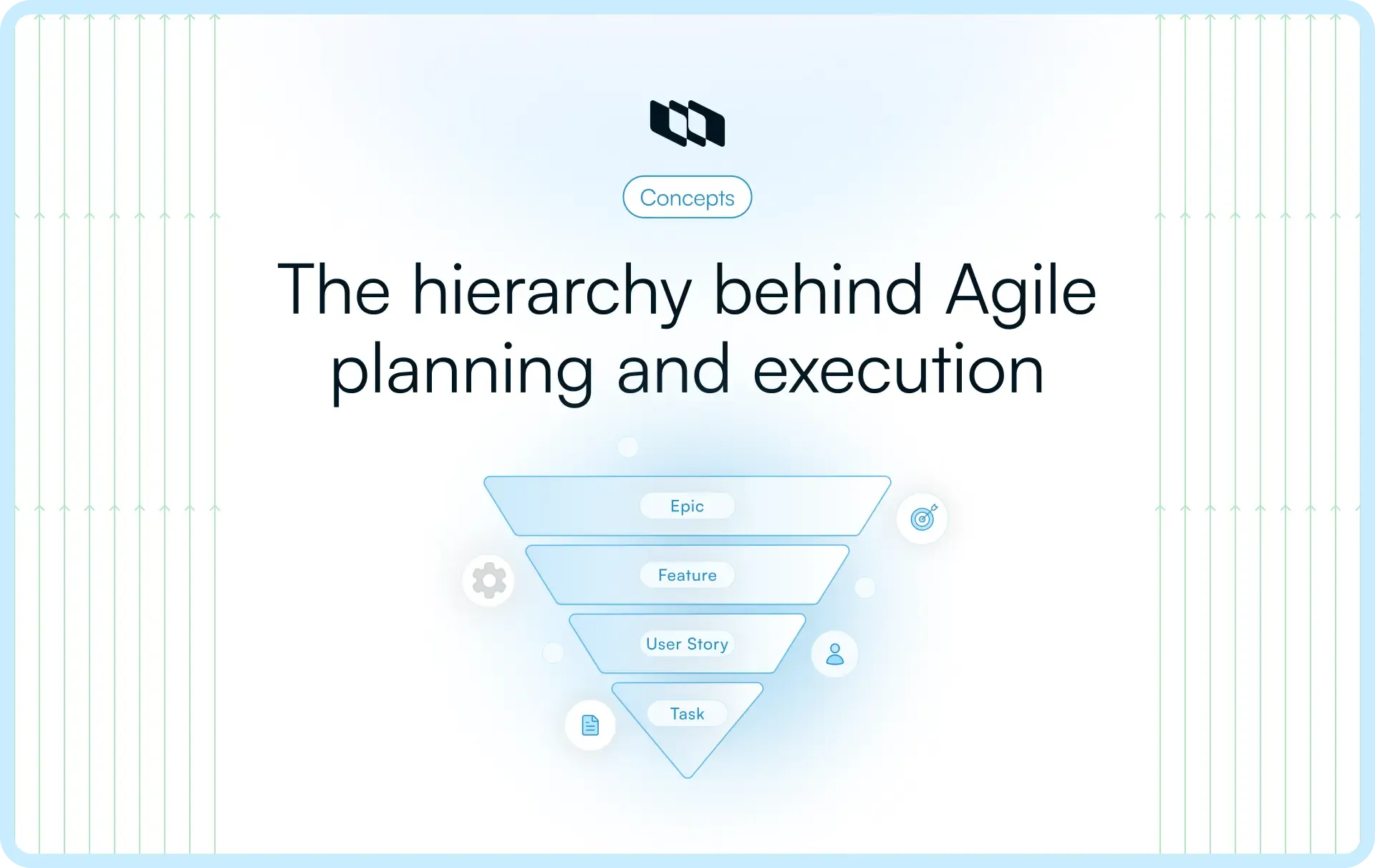
Before getting into definitions, it helps to have a mental model. Think of these four work item types as zoom levels on the same piece of work. Each level gets more specific, more actionable, and closer to actual implementation. Here is how each one sits in the agile work breakdown structure:
An epic is the biggest zoom-out: Captures a large outcome area
- Epics sit at the top of the hierarchy and represent broad, strategic outcomes rather than specific deliverables.
- A single epic typically spans multiple sprints and contains several features.
- Think of an epic as the "what we are working toward" rather than "what we are building this sprint."
- Example: "Improve the onboarding experience for new users" is an epic. It is directional, not prescriptive.
A feature is a meaningful, deliverable product capability
- Features live inside epics and represent a functional slice of the product that delivers real value to users.
- A feature is concrete enough to be scoped and shipped, but broad enough to contain multiple user stories.
- It bridges strategic intent (the epic) and actual user-facing work (the stories).
- Example: "Onboarding checklist for first-time users" is a feature sitting inside the onboarding epic.
A user story captures one specific user need
- User stories are where the team starts thinking from the user's perspective, not the system's perspective.
- They are small, focused, and testable within a single sprint.
- The classic format, "As a [user], I want [action], so that [outcome]," exists to keep the story tied to a real need.
- Example: "As a new user, I want to see my setup progress, so that I know what steps remain."
A task is the actual implementation work that gets the story done
- Tasks are the most granular unit in the hierarchy. They live inside user stories and represent concrete, assignable work.
- A single user story usually breaks down into multiple tasks across design, development, and QA.
- Tasks are less about user value and more about execution clarity: who does what, and by when.
- Example: "Write API endpoint for checklist progress tracking" is a task inside the onboarding checklist story.
What is an epic in project management?
An epic represents a large outcome area that helps teams organize related work across multiple delivery cycles. In the agile work item hierarchy, an epic connects roadmap direction with execution planning by grouping features and user stories that contribute to a shared objective. Teams use epics to structure complex initiatives before breaking them into smaller layers, such as features, stories, and tasks, which makes the relationships among epics, features, user stories, and tasks easier to manage within a scalable agile backlog hierarchy.
Teams create epics when work is too large to estimate or deliver in one sprint
Epics help teams structure work that extends beyond the scope of one sprint and requires coordination across multiple capabilities. Product and engineering teams typically create epics to:
- Organize large roadmap priorities into manageable outcome areas
- Group-related features that contribute to a shared product objective
- Maintain visibility across initiatives that evolve over several cycles
- Align delivery efforts with strategic product direction
This level of structure clarifies the difference between an epic feature, a user story, and a task in agile by separating outcome planning from execution planning.
What makes an epic different from smaller backlog items
An epic operates at a broader level than features, user stories, or tasks and supports planning decisions that span longer delivery timelines. Unlike smaller backlog items, epics help teams:
- Define outcome-level direction instead of implementation details
- Coordinate multiple related capabilities under one planning structure
- Track progress across several features and stories over time
- Maintain alignment between roadmap intent and delivery execution
These characteristics position epics as a foundational layer within the agile work item hierarchy.
Example of an epic in a real product workflow
Consider a SaaS product team building a reporting module. The epic might be defined as: "Build a reporting and analytics layer for workspace admins."
This epic is too large to estimate directly. Underneath it, the team would create features like "Custom report builder," "Scheduled report delivery," and "Export to CSV and PDF." Each feature then breaks down further into user stories and tasks. The epic serves as the strategic container that keeps all related work aligned with the same product goal, making it visible at the roadmap level without overwhelming sprint planning with every granular detail.
What is a feature in project management?
A feature is a capability-level deliverable that sits between an epic and a user story in the agile work hierarchy. It represents a functional part of the product that users or stakeholders can actually experience. Features are specific enough to be scoped and delivered, but broad enough to encompass multiple user stories. They are where strategic intent begins to take shape as actual product functionality.
Features are how strategy becomes actual product functionality
Epics define direction. Features define delivery. When a team looks at an epic and asks "what do we actually need to build to accomplish this?", the answers are features. Each feature translates a piece of the broader goal into a concrete, shippable product capability.
This is what makes features particularly valuable in quarterly and sprint planning. They give product managers a layer for prioritizing and sequencing work without getting pulled into implementation details too early. A feature is specific enough to estimate at a high level, assign to a squad, and track on a roadmap, while still leaving room for the engineering team to define the exact stories and tasks underneath it.
How a feature differs from an epic
Features and epics both live above user stories in the hierarchy, but they operate at meaningfully different levels:
- Scope: An epic covers a broad outcome area with multiple capabilities inside it. A feature covers one specific capability within that area.
- Deliverability: Features are designed to be shipped. An epic is a container for related work, not a deliverable in itself.
- Proximity to implementation: Features are close enough to the actual product that a designer or engineer can look at one and immediately understand what needs to be built. Epics require further breakdown before implementation work can begin.
- Timeline: A feature is typically delivered within 1 or 2 sprints. An epic spans several sprints and multiple features.
Example of a feature nested inside an epic
Using the earlier epic, "Build a reporting and analytics layer for workspace admins," one feature sitting inside it could be: "Custom report builder."
This feature is specific and deliverable. A product designer can wire it up, an engineer can scope the API requirements, and a QA engineer can write test cases against it. Under this feature, the team would create user stories such as "As an admin, I want to select metrics and build a custom report view, so that I can track the data most relevant to my team." The feature gives the stories a shared context and keeps them connected to the larger epic goal without merging into it.
What is a user story?
A user story is the smallest unit of user-centered value in the agile hierarchy. It represents a specific need, from a specific user's perspective, that the team can design, build, and ship within a single sprint. Unlike epics and features, which are planning and capability-level constructs, user stories are written from the outside in. They start with the user's goal and work backward into what the product needs to do to support it.
The standard user story structure teams use
The most widely used format for writing user stories follows a three-part structure: "As a [type of user], I want [an action or capability], so that [an outcome or benefit]."
Each part of this structure serves a specific purpose:
- "As a [user]" identifies who the story is for, keeping the team anchored to a real person rather than a system requirement.
- "I want [action]" defines the specific capability or interaction being requested, keeping scope tight and testable.
- "So that [outcome]" captures the reason behind the request, giving the team context to make better design and implementation decisions.
This format keeps stories user-focused rather than feature-focused, which is a meaningful distinction. A story written around a user's goal is far easier to validate and test than one written around a system behavior.
What makes a story small enough for sprint planning
A well-scoped user story fits comfortably within a single sprint. A few practical signals that a story is sized correctly:
- One developer or a small pair can own and complete it within the sprint.
- It has a clear, testable acceptance criterion that the team can verify before closing it.
- It delivers standalone value, meaning it moves the product forward even if nothing else in the sprint ships alongside it.
- It can be reliably estimated, typically in story points ranging from 1 to 8, depending on the team's scale.
When a story starts requiring multiple developers across multiple sprints, it is worth checking whether it has grown into a feature rather than staying a story.
Example of a user story inside a feature
Continuing with the "Custom report builder" feature from the earlier example, one user story sitting inside it could be framed as: "As a workspace admin, I want to select which metrics appear in my report, so that I can focus on the data most relevant to my team's goals."
This story is specific, user-centered, and deliverable within a sprint. It has a clear actor, a defined action, and a meaningful outcome. Underneath it, the team would create tasks covering the UI for metric selection, the backend logic for filtering data, and QA test cases to validate the output. The story keeps the implementation work connected to the user's actual need rather than treating it as a standalone engineering task.
What is a task in project workflows?
A task is the most granular unit of work in the agile hierarchy. It sits within a user story and represents a specific, concrete action a team member must complete to move the story forward. Tasks are purely execution-level. They describe implementation steps, not user outcomes, and they are designed to be picked up, completed, and closed within a short window, often within a day or two.
Why tasks and user stories are fundamentally different things
The distinction between a task and a user story comes down to perspective. User stories are written from the outside in, starting with what a user needs and why. Tasks are written from the inside out, starting with what a developer, designer, or QA engineer needs to do.
A user story answers the question: "What value are we delivering and for whom?" A task answers the question: "What specific work needs to happen to make that delivery possible?"
This distinction matters in practice because it keeps sprint planning and daily execution organized at the right level. Teams plan sprints around stories because stories represent shippable value. Teams manage daily work around tasks because tasks represent individual contributions toward that value.
When it makes sense to break a story into tasks
Tasks become particularly useful when a user story requires coordination across multiple contributors or disciplines. A few situations where creating tasks adds real clarity:
- A story requires separate work streams across design, frontend, backend, and QA, each of which needs to be tracked independently.
- Multiple team members are contributing to the same story, and ownership of each piece needs to be explicit.
- The story has a non-trivial implementation path, and breaking it into steps helps surface dependencies early.
- The team wants granular visibility into progress within a sprint, rather than waiting until the story is fully complete.
For simpler stories owned by a single contributor, tasks can be kept lightweight or skipped entirely. The goal is clarity, not overhead.
Example of tasks broken out from a user story
Taking the earlier user story, "As a workspace admin, I want to select which metrics appear in my report, so that I can focus on the data most relevant to my team's goals," here is how the implementation breaks down into tasks:
- Design: Create UI mockups for the metric selection panel and get design review sign-off.
- Frontend: Build the metric selection component with multi-select and drag-to-reorder functionality.
- Backend: Write the API endpoint that accepts selected metrics and filters the report data accordingly.
- Integration: Connect the frontend selection component to the backend filtering API.
- QA: Write and execute test cases covering metric selection, report rendering, and edge cases like empty selections.
Each task is owned by a specific contributor, scoped to a concrete deliverable, and completable within one to two days. Together, they add up to the full story being shipped. Individually, they give the team precise visibility into where the work stands at any point in the sprint.
Epic vs. feature vs. user story vs. task: Key differences
Understanding each work item type individually is useful. Understanding how they compare across the same dimensions is what actually changes how a team plans and executes. Here is a structured breakdown across the five areas that matter most.
1. Scope
Each work item type covers a fundamentally different surface area of the product:
- An epic covers a broad strategic outcome, something that shapes a product area over an entire quarter or release cycle.
- A feature covers a specific product capability within that outcome, something a user can interact with and a team can ship.
- A user story covers a single user need within a feature, scoped tightly enough to be designed, built, and tested in one sprint.
- A task is a single concrete implementation step within a story, owned by a single contributor and completable within a day or two.
The scope narrows with every level down the hierarchy. Epics are directional. Tasks are surgical.
2. Timeline
The four work item types also operate on completely different time horizons:
- Epics span multiple sprints, often an entire quarter or longer. They are the unit of roadmap planning.
- Features are scoped to one or two sprints. They are the unit of release planning.
- User stories are designed to be completed within a single sprint. They are the unit of sprint planning.
- Tasks are completed within one to two days. They are the unit of daily execution.
Mixing these up during planning, such as treating a multi-quarter epic as a sprint task, is one of the most common reasons sprint velocity becomes unreliable.
3. Level of detail
The amount of specificity required at each level scales with proximity to implementation:
- Epics are intentionally high-level. They describe direction and desired outcomes, leaving room for discovery and refinement as work progresses.
- Features require sufficient detail to be scoped, high-level estimated, and assigned to a squad or team.
- User stories require clear acceptance criteria, a defined user perspective, and enough specificity for a developer to begin implementation.
- Tasks require the most detail of all: a specific action, a clear owner, and a definition of done that leaves no ambiguity.
A team that tries to add task-level detail to epics early in planning wastes time on work that will change. A team that leaves stories at the epic level of vagueness will struggle to ship anything predictably.
4. Ownership and audience
Each layer of the hierarchy is most relevant to a different part of the organization:
- Epics are owned and monitored by product leadership, founders, and engineering managers, who track progress against strategic goals and OKRs.
- Features are owned by product managers who are responsible for scoping, prioritizing, and sequencing deliverable capabilities on the roadmap.
- User stories are owned collaboratively by product managers and engineers, with engineers taking primary ownership during sprint execution.
- Tasks are owned by individual contributors, whether a frontend developer, a designer, or a QA engineer, who are responsible for completing their specific piece of the work.
When the wrong audience reviews the wrong layer, planning meetings slow down, and decision-making gets muddled.
5. Purpose within the backlog
Each work item type plays a distinct structural role in how the backlog functions:
- Epics serve a planning role. They organize the backlog around strategic outcomes, enabling portfolio-level prioritization.
- Features serve a coordination role. They group related stories together, making it easier for product and engineering to align on what is being built and why.
- User stories serve a delivery role. They define the units of value that the team commits to shipping in each sprint.
- Tasks serve an execution role. They provide the granular visibility teams need to track daily progress and surface blockers early.
A healthy backlog uses all four layers for their intended purposes, rather than collapsing everything into a single flat list of items.
Comparison at a glance
Factors | Epic | Feature | User story | Task |
Definition | Large strategic outcome area | Deliverable product capability | Specific user-centered need | Concrete implementation step |
Scope | Broad, multi-capability | Single capability | Single user needs | Single action |
Timeline | Multiple sprints/quarters | One to two sprints | One sprint | One to two days |
Owner | Product leadership / EM | Product manager | PM and engineer | Individual contributor |
Example | Build a reporting and analytics layer | Custom report builder | Admin selects metrics for the report | Build metric selection API endpoint |
This structured comparison clarifies how each layer contributes to a consistent agile backlog hierarchy and supports teams working across roadmap planning, sprint delivery, and execution coordination.
Feature vs. user story: The most common source of confusion
Understanding this relationship helps teams apply the structure behind epic vs. feature vs. user story vs. task more consistently across a working agile backlog hierarchy.
Features describe system capabilities that organize related delivery work
A feature represents a functional capability that improves how the product behaves for a group of users or a workflow area. Teams use features to structure capability-level planning before breaking work into smaller delivery slices. Features typically:
- Define what the product enables users to do
- Group related user stories within one capability area
- Connect roadmap priorities with delivery planning
- Help teams track progress across functional improvements
This capability-level focus places features between outcome planning and sprint execution within the agile work item hierarchy.
User stories describe user intent and the value delivered through that capability
A user story captures a specific interaction or outcome that matters to someone using the product, ensuring delivery stays aligned with real usage needs. Stories translate capability-level improvements into testable increments of value that fit within sprint planning. Teams rely on user stories to:
- Describe who benefits from a change
- Clarify what outcome the user expects
- Connect delivery work with measurable value
- Support estimation and prioritization decisions
This distinction clarifies the differences among an epic feature, a user story, and a task in agile by separating capability planning from delivery intent.
How one feature breaks into multiple user stories in practice
Continuing with the "Custom report builder" feature from earlier, here is how it naturally expands into multiple user stories, each representing a distinct user need within the same capability:
- "As a workspace admin, I want to select which metrics appear in my report, so that I can focus on data relevant to my team's goals."
- "As a workspace admin, I want to save a custom report configuration, so that I can reuse it across multiple reporting cycles."
- "As a workspace admin, I want to share a saved report with other team members, so that my team stays aligned on the same data view."
- "As a workspace admin, I want to schedule a report to run automatically, so that I receive updates without manual effort each week."
Each story is a separate unit of deliverable value. Each one can be estimated, prioritized, and shipped independently. Together, they constitute the full feature. The feature gives them a shared strategic context. The stories give the team a clear, actionable path to delivering that feature incrementally, sprint by sprint.
Example of the full hierarchy in action
Definitions and comparisons are useful. Seeing the full hierarchy play out across a single, coherent product initiative is what makes it click. Here is a complete decomposition of a real-world product goal, from the strategic epic all the way down to individual implementation tasks.
Epic: Improve the customer onboarding experience
The team's product goal for the quarter is to reduce time-to-value for new users. The epic is defined as: "Improve the customer onboarding experience to drive faster activation and higher retention."
This epic covers multiple product surfaces, involves design, engineering, and growth, and will span several sprints. It lives on the roadmap tied directly to a retention OKR. Before the team can sprint-plan against it, it needs to break it down into features.
Features: Concrete capabilities that deliver the epic
The product manager scopes the following capabilities under this epic:
- Onboarding checklist: A progress-tracking checklist surfaced to new users after signup, guiding them through key setup steps.
- Guided setup flow: A step-by-step interactive walkthrough that activates on first login and configures the user's workspace.
Each feature is specific enough to be assigned to a squad, estimated at a high level, and tracked independently on the roadmap.
User stories: User-centered slices within each feature
Taking the onboarding checklist feature, here are two stories scoped for sprint delivery:
- "As a new user, I want to see a checklist of setup steps after signing up, so that I know exactly what to do to get my workspace ready."
- "As a new user, I want my checklist progress to update in real time as I complete steps, so that I feel a sense of momentum during setup."
Each story is independently estimable, shippable, and testable within a single sprint.
Tasks: Implementation steps that get each story done
Taking the real-time progress story, the implementation breaks down into:
- Frontend: Build the checklist progress component that updates in real time in response to user actions.
- Backend: Write the API endpoint that tracks completion events and updates the user's progress state.
- QA: Write and execute test cases covering real-time updates, edge cases, and regression testing.
Each task has a clear owner and a concrete definition of done. Together, they complete one story, that story advances the feature, and the feature moves the epic forward. The hierarchy holds from strategy to implementation.
Best practices for using epics, features, stories, and tasks effectively
Understanding the hierarchy is step one. Using it consistently in day-to-day planning is where teams actually see the payoff. These practices keep the four layers working the way they are designed to.
1. Keep each level focused on its planning role within the hierarchy
Each work item type supports a different level of planning and becomes more effective when teams preserve that distinction during backlog refinement. Epics organize outcome areas, features define capabilities, user stories describe user value, and tasks coordinate execution steps. Maintaining this structure helps teams consistently apply the distinctions among an epic feature, a user story, and a task across delivery cycles.
2. Break work down progressively as delivery moves closer to execution
Work becomes easier to manage when teams introduce detail at the right stage instead of defining implementation steps too early. Product teams typically start with epics to capture direction, introduce features to define capabilities, shape user stories for sprint planning, and create tasks during execution coordination. This progressive decomposition supports a reliable, agile work-item hierarchy that evolves with delivery priorities.
3. Keep user stories aligned with real user outcomes rather than implementation activity
User stories provide the clearest planning clarity when they describe outcomes experienced by people using the product rather than internal system behavior. Stories that reflect user intent help teams estimate delivery more accurately and maintain alignment between roadmap priorities and sprint execution inside the agile backlog hierarchy.
4. Use tasks to clarify execution ownership across contributors
Tasks improve coordination when stories involve multiple implementation steps across engineering, design, and testing workflows. Clearly defined execution steps help contributors understand responsibility boundaries and maintain delivery momentum across sprint cycles within the agile work item hierarchy.
5. Maintain traceability from outcome-level direction to implementation-level work
Delivery visibility improves when teams connect smaller work items to the broader outcomes they support. Linking tasks to stories, stories to features, and features to epics helps stakeholders understand how execution contributes to roadmap priorities and reinforces structure across the agile backlog hierarchy.
Final thoughts
A clear backlog structure helps teams move from product direction to delivery without losing alignment across planning layers. Understanding the relationship among epic, feature, user story, and task allows teams to organize work across outcomes, capabilities, user value, and execution steps in a way that supports consistent decision-making. When each layer plays its intended role inside the agile work item hierarchy, teams gain better visibility into progress, priorities, and delivery sequencing across cycles.
A well-structured agile backlog hierarchy also improves collaboration between leadership, product, and engineering by connecting roadmap intent with sprint-level execution. Teams that maintain this structure can translate strategy into deliverable value more predictably while keeping implementation work connected to meaningful outcomes.
Frequently asked questions
Q1. What are the 3 C’s of Agile?
The 3 C’s of Agile describe how teams define and refine user stories during planning:
- Card represents the written description of the user story
- Conversation represents discussions that clarify requirements and expectations
- Confirmation represents acceptance criteria that validate delivery outcomes
Together, these elements ensure user stories remain clear, testable, and aligned with delivery goals within the agile work item hierarchy.
Q2. What are the 4 pillars of Agile?
The four pillars of Agile refer to the core value priorities defined in the Agile Manifesto that guide modern delivery practices:
- Individuals and interactions over processes and tools
- Working software over comprehensive documentation
- Customer collaboration over contract negotiation
- Responding to change by following a fixed plan
These principles shape how teams structure planning layers such as epics, features, user stories, and tasks inside an effective agile backlog hierarchy.
Q3. What is the 3-5-3 rule in Agile?
The 3-5-3 rule in Agile supports sprint planning by helping teams structure story distribution across complexity levels:
- 3 small stories that deliver quick wins
- 5 medium stories that represent standard sprint work
- 3 larger stories that introduce meaningful capability progress
This approach helps maintain balanced delivery flow while working across multiple layers of the agile work item hierarchy.
Q4. What is the difference between epic and feature in Jira?
In Jira, an epic represents a large outcome area that groups related work across multiple stories, while a feature represents a capability-level improvement that contributes to that outcome. Epics organize direction at a broader planning level, while features help teams structure functional delivery within that direction. Understanding this distinction clarifies the differences between epic, feature, user story, and task within a structured backlog environment.
Q5. What are 13 story points in Agile?
Thirteen story points represent a high-complexity estimate within Fibonacci-based story point sizing used in Agile planning. A story with 13 points typically involves multiple dependencies, uncertainty in implementation steps, or coordination across contributors. Teams often treat stories of this size as candidates for further breakdown into smaller user stories that fit more naturally within sprint-level delivery planning.
Recommended for you



 Download for Mac
 Download for Android