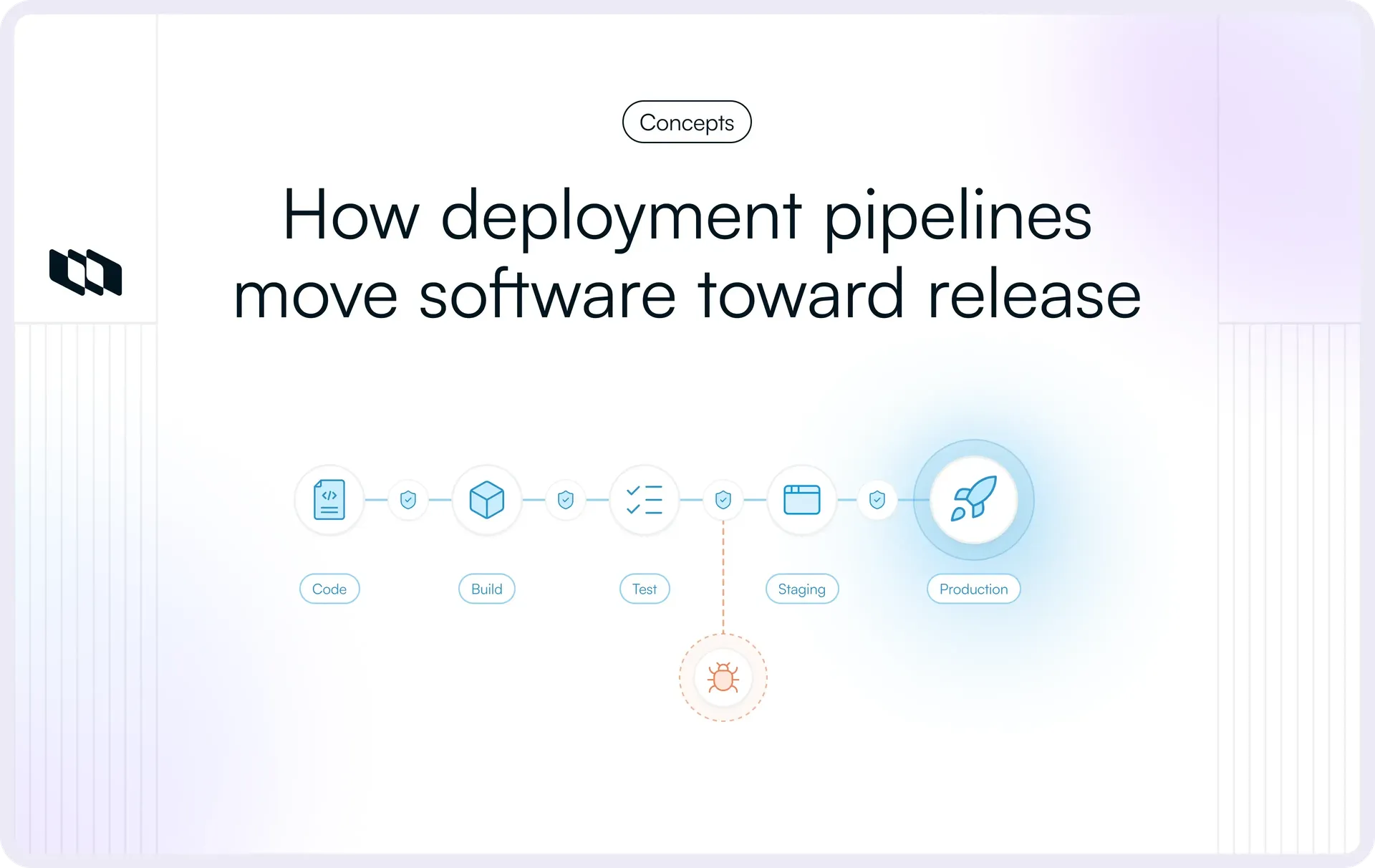
Introduction
Shipping software reliably depends on more than writing code. Every change has to be built, tested, validated, and moved through the right environments before it reaches users. A deployment pipeline gives engineering teams a structured way to manage that process.
In this guide, we’ll explain what a deployment pipeline is, how a deployment pipeline works, the main deployment pipeline stages, how it fits into a CI/CD pipeline, and why teams use deployment automation to release software faster and with fewer avoidable failures.
What is a deployment pipeline?
A deployment pipeline is a sequence of automated and controlled stages that moves a software change from source control toward production. It gives engineering teams a repeatable path for building, testing, validating, and releasing changes while checking that each one is ready to move forward.
A typical deployment pipeline connects:
- Source control: Stores the code and records the change that triggers the pipeline.
- Build: Compiles or packages the application and prepares it for testing.
- Testing: Runs automated checks to verify that the change behaves as expected.
- Environments: Moves the release through development, testing, staging, and production environments as required.
- Approvals: Adds automated or human checks before higher-risk stages.
- Deployment: Releases the validated software into production.
- Post-release validation: Confirms that the application remains healthy after deployment.
How promotion works in a deployment pipeline
A change progresses through the pipeline through a process often called promotion. Each stage defines conditions that must be satisfied before the change can move to the next one.
For example, a build may need to complete successfully and pass its automated tests before the resulting artifact is promoted to staging. Once staging validation succeeds, that same release can become eligible for production.
What are quality gates?
Quality gates are the checks that control this progression. Depending on the application and the team's release process, they can include:
- Automated test results
- Code quality checks
- Security scans
- Performance thresholds
- Compliance requirements
- Release approvals
If a required check fails, the pipeline stops the change from progressing until the issue is resolved.
Can deployment pipelines include manual approvals?
Deployment automation does not require every decision to happen automatically. Teams often automate repeatable checks while keeping human approval at stages where operational risk, security, or governance requires additional oversight.
The amount of manual intervention varies depending on whether the team follows continuous delivery, continuous deployment, or another release model.
Deployment pipeline vs. deployment script
A deployment script usually performs a specific task, such as copying an application to a server or updating a service.
A deployment pipeline coordinates the broader software delivery process. It connects multiple jobs, environments, checks, artifacts, approvals, and deployment steps into one controlled workflow from code change to production.
How does a deployment pipeline work?
A deployment pipeline works by moving a software change through a defined sequence of build, validation, release, and monitoring stages. Each stage produces evidence that the change is ready to progress, while failed checks stop it before it reaches a higher-risk environment.
Here is how a typical deployment pipeline works from code change to production.
1. A code change triggers the pipeline
The process usually begins when a developer commits, pushes, or merges code in a version control system. A configured event, such as a pull request merge or commit to a specific branch, then triggers the CI/CD pipeline automatically.
At this point, the pipeline knows which revision of the code it needs to process and can associate every later build, test result, and deployment with that change.
2. The application is built
The pipeline prepares the application in a form that can be tested and eventually deployed. Depending on the technology stack, this may involve:
- Compiling source code
- Resolving dependencies
- Installing required packages
- Running basic syntax or configuration checks
- Packaging application components
If the build fails, the pipeline stops and reports the failure before additional testing or deployment work begins.
3. A deployable artifact is created
A successful build produces a versioned artifact, such as a container image, binary, application package, or archive. The artifact is stored in a registry or repository so later deployment pipeline stages can use the exact same output.
Promoting the same artifact through testing, staging, and production gives teams greater confidence that the software they validated is the software they eventually release. Rebuilding the application for each environment can introduce differences in dependencies, configuration, or build output that were never tested earlier in the process.
4. Automated tests and checks run
The artifact and associated code then pass through automated validation. The exact checks depend on the application and the team's engineering practices, but commonly include:
- Unit tests to check individual functions or components
- Integration tests to verify that services and dependencies work together
- Acceptance or end-to-end tests to validate complete user flows
- Code quality checks to identify maintainability or correctness issues
- Security checks to detect vulnerable dependencies, unsafe code, or configuration problems
These checks serve as quality gates. When a required test or scan fails, the change is blocked from progressing until the underlying issue is addressed.
5. The artifact moves to a staging environment
Once the earlier checks pass, the pipeline can deploy the artifact into a staging or other pre-production environment.
Staging gives teams a place to validate the release under conditions that resemble production. They can check application behavior, integrations with other systems, infrastructure configuration, database changes, and environment-specific dependencies. Broader acceptance, performance, or regression tests may also run at this stage.
The closer staging reflects the conditions that matter in production, the more useful it becomes for identifying issues before release.
If you want to see how engineering teams can improve pre-production validation, check out our guide on ephemeral deployment previews.
6. Release gates determine whether the change can proceed
Before a release reaches production, the deployment pipeline can apply another set of promotion criteria. These gates may include:
- Required test and quality thresholds
- Security or compliance checks
- Successful staging validation
- Change-management requirements
- Manual approval for sensitive or higher-risk releases
The balance between automated and human approval depends on the team's release model. A continuous deployment pipeline may send qualifying changes directly to production, while a continuous delivery process may keep the release ready until someone explicitly approves it.
7. The change is deployed to production
Once all required gates have passed, deployment automation releases the validated artifact into the production environment.
Teams may use a rolling, blue-green, canary, or another deployment strategy depending on their architecture and tolerance for release risk. Automating this stage helps keep deployments repeatable and reduces variation between releases caused by manually executed steps.
8. The release is verified and monitored
Production deployment is followed by verification. The pipeline or connected observability systems can run health checks and monitor signals such as:
- Application errors
- Service availability
- Response times
- Infrastructure health
- Logs and traces
- Key application metrics
If production verification shows that the release is unhealthy, the team can trigger a rollback, redirect traffic to a previous version, disable the affected feature, or apply another recovery procedure.
This feedback closes the deployment pipeline loop. The pipeline carries a change from source control into production, while monitoring provides the information teams need to confirm that the release continues to work after users begin interacting with it.
How do you build a deployment pipeline?
Building a deployment pipeline starts with understanding how software currently moves from a code change to production. From there, teams can automate repeatable work, introduce reliable validation, define promotion rules, and add the monitoring needed to keep releases safe over time.
1. Map the path from code to production
Document the current release process from commit or merge through production deployment. Capture the environments, manual steps, team handoffs, dependencies, and approvals involved.
This gives you a clear view of where releases slow down, where errors are likely to occur, and which steps should be automated first.
2. Automate the build and create a versioned artifact
Configure the pipeline to build the application consistently and produce a deployable artifact, such as a binary, package, or container image.
Store each artifact with a unique version in a registry or repository. The same validated artifact should then move through later deployment pipeline stages rather than being rebuilt for each environment.
3. Add automated tests and quality checks
Introduce validation at the points where it provides the fastest useful feedback. This can include:
- Unit and integration tests
- Acceptance or end-to-end tests
- Code quality checks
- Dependency and security scanning
- Configuration validation
Start with fast checks early in the pipeline, then run broader or more expensive tests after the change has cleared those initial gates.
4. Define your deployment environments
Decide which environments the release needs to pass through before production. Many teams use at least a staging or pre-production environment for broader validation.
Keep configuration and infrastructure as consistent as practical across environments so that staging results remain meaningful when the same artifact reaches production.
5. Establish promotion criteria and release gates
Define what a release must satisfy before it can move from one stage to the next.
Promotion criteria might include successful automated tests, security thresholds, staging health checks, or required approvals. Make these rules explicit so that release decisions remain consistent across deployments.
6. Automate deployment, verification, and recovery
Configure deployment automation to move approved releases into production using the appropriate rollout strategy.
The workflow should also verify the release after deployment through health checks and relevant application signals. Define the recovery path at the same time, whether that involves rollback, traffic switching, pausing a rollout, or disabling a feature.
7. Monitor the pipeline and improve it over time
Once the pipeline is running, track how well it performs. Look at pipeline duration, failed stages, deployment frequency, change failure rate, and recovery time.
Use that data to identify slow tests, fragile stages, recurring failures, or unnecessary manual handoffs. A deployment pipeline should evolve alongside the application, infrastructure, and engineering team's release practices.
What are the main stages of a deployment pipeline?
Most deployment pipelines follow the same general path: capture a code change, turn it into a deployable release, validate it, move it through the required environments, and confirm that it behaves correctly in production. The exact deployment pipeline stages depend on the application and the team's release process.
Stage | What happens | Main purpose |
Source control | Developers commit or merge code into a version control system, which can trigger the pipeline. | Establish a traceable starting point for each software change. |
Build | The pipeline compiles, packages, and prepares the application while resolving required dependencies. | Confirm that the code can produce a usable build. |
Artifact creation | A versioned binary, package, container image, or other deployable artifact is created and stored. | Provide a consistent release artifact that can move through later stages. |
Automated testing | Unit, integration, acceptance, security, and other relevant checks run against the change. | Catch defects and quality issues before the release progresses. |
Staging | The artifact is deployed to a pre-production environment for broader validation. | Test application behavior, integrations, configuration, and infrastructure under production-like conditions. |
Approval or promotion gate | Automated criteria or human approvals determine whether the release can continue. | Prevent changes that have not met required quality, security, or governance conditions from reaching production. |
Production deployment | The validated artifact is released to the live environment using the team's chosen deployment strategy. | Make the approved software version available to users. |
Monitoring and feedback | Health checks, logs, metrics, traces, and application behavior are monitored after release. | Confirm that the deployment is healthy and surface issues that require rollback or remediation. |
There is no fixed number of stages that every CI/CD deployment pipeline needs. A small application may use a relatively short workflow, while a distributed or highly regulated system may include several testing environments, security reviews, approval gates, and progressive rollout steps. Application architecture, infrastructure, release risk, compliance requirements, and the team's approach to deployment automation all shape the final pipeline.
How is a deployment pipeline different from a CI/CD pipeline?
A deployment pipeline and a CI/CD pipeline are closely related, which is why the terms are often used interchangeably. The distinction comes down to what each term emphasizes.
CI/CD describes the engineering practices used to integrate, validate, prepare, and release software continuously. A deployment pipeline describes the staged workflow that carries a change through those activities, from source control and testing to deployment and production verification.
Concept | Primary purpose | Typical scope | Production release |
Continuous integration (CI) | Integrate code changes frequently and validate them automatically. | Source control, build, automated tests, and other early validation checks. | Usually outside the core CI process. |
Continuous delivery | Keep software in a validated, release-ready state. | Extends CI through packaging, testing, staging, and release preparation. | Typically requires an explicit approval or release action. |
Continuous deployment | Release every qualifying change automatically. | Extends continuous delivery through automated production deployment. | Happens automatically after all required checks pass. |
Deployment pipeline | Move a software change through defined stages and controls toward production. | Can span source control, build, artifact creation, testing, staging, approvals, deployment, and monitoring. | Depends on how the pipeline is configured and whether the team uses continuous delivery or continuous deployment. |
Continuous integration
Continuous integration focuses on integrating code changes frequently and validating them as early as possible. When developers push or merge changes, the CI pipeline automatically builds the application and runs relevant tests.
This gives developers fast feedback on issues such as compilation failures, broken tests, or integration problems before those changes move further through the software delivery process.
Continuous delivery
Continuous delivery extends the workflow beyond integration and testing. Changes that pass the required checks are packaged, validated in suitable environments, and kept ready for production.
The final production release can still involve an explicit decision, such as an approval from an engineer, release manager, or change-management process. This gives teams control over when a validated version reaches users.
Continuous deployment
Continuous deployment takes automation one step further. Every change that satisfies the required tests, quality gates, security checks, and other release criteria is automatically deployed to production.
This model depends heavily on reliable automated testing, monitoring, rollback mechanisms, and well-defined release controls because production deployments can happen frequently.
Deployment pipeline
A deployment pipeline is the staged workflow that connects these practices. It defines how a change moves from source control through builds, tests, environments, promotion gates, deployment, and post-release verification.
The same deployment pipeline can support different delivery models. One team may stop before production and require manual approval, while another may automatically deploy every qualifying change. The underlying stages can be similar even when the release policy differs.
This is why deployment pipeline vs. CI/CD pipeline is less about choosing between two competing concepts and more about understanding their scope. CI/CD describes the practices and level of automation, while the deployment pipeline provides the workflow through which those practices are executed.
If you want to understand how these workflows fit into broader engineering operations, check out our guide on how DevOps and SRE teams use Plane.
Why do engineering teams need deployment pipelines?
The main benefits of a deployment pipeline come from making software delivery repeatable, observable, and easier to control. As release frequency increases, relying on manual coordination across builds, tests, environments, and production deployments creates more opportunities for delays and errors.
A well-designed deployment pipeline gives engineering teams a shared process for moving changes forward while maintaining clear checks at each stage.
1. Faster delivery
Deployment automation removes repetitive work from the release process. Builds, tests, artifact creation, environment deployments, and verification steps can run automatically once a change enters the pipeline.
This shortens the time between completing a change and making it available to users. Developers also spend less time coordinating routine release tasks manually, which becomes increasingly valuable as teams ship more frequently.
2. More consistent releases
A deployment pipeline sends changes through the same defined sequence of stages and checks each time. Teams can standardize how applications are built, tested, promoted, and deployed across releases.
That consistency reduces variation caused by manually executed procedures, undocumented steps, or different engineers following slightly different release processes. It also makes the workflow easier to review and improve over time.
If you want to understand how teams coordinate releases beyond the pipeline itself, check out our guide on release management.
3. Earlier detection of problems
Problems become more expensive to resolve as they move closer to production. Automated validation gives teams feedback earlier in the delivery process.
A pipeline can surface compilation errors, failed tests, integration issues, security vulnerabilities, or configuration problems before a release progresses. Developers can then address the issue while the change and its context are still fresh.
4. Lower deployment risk
Quality gates give teams explicit criteria for deciding whether a release can move forward. A change may need to pass automated tests, security scans, staging validation, or an approval step before reaching production.
Reliable pipelines also make smaller, more frequent releases practical. Smaller changes are generally easier to validate, diagnose, and recover from because fewer modifications are introduced in each deployment.
5. Faster recovery when releases fail
Even thoroughly tested releases can encounter problems in production. A deployment pipeline gives teams more context and control when recovery is required.
Versioned artifacts and deployment history show exactly which release reached each environment. Depending on the deployment strategy, teams can roll back to a previous version, redirect traffic, disable a problematic feature, or redeploy a known working artifact.
6. Better visibility across delivery
A DevOps pipeline provides a common view of how software is moving toward production. Engineers can see which stage a release has reached, which checks have completed, and what is preventing a blocked change from progressing.
This visibility is especially useful when several teams or services participate in the same release process. Instead of reconstructing the status through messages or handoffs, teams can work from the pipeline's build, test, and deployment history.
7. Stronger traceability and governance
Deployment pipelines create a record of the activities surrounding a release. Depending on the tooling and process, that record can include:
- The code revision associated with the release
- Build and test results
- Security and quality checks
- The artifact that was promoted
- Approval history
- Deployment timestamps and target environments
- The version currently running in production
This traceability helps engineering teams investigate incidents and understand how a release reached production. It also supports organizations that need stronger change controls, approval records, or audit evidence as part of their software delivery process.
What deployment strategies can teams use?
Once a release reaches the production deployment stage, teams still need to decide how that release will be introduced to users. The deployment strategy determines how quickly the new version replaces the existing one, how much traffic reaches it initially, and how easily the team can respond if problems appear.
The right approach depends on the application's architecture, infrastructure, traffic patterns, and tolerance for release risk.
1. Rolling deployment
A rolling deployment replaces application instances gradually rather than updating the entire production environment at once.
For example, if an application runs across multiple servers or containers, the deployment process can update a subset first, confirm that those instances are healthy, and then continue with the rest.
This approach can:
- Reduce or avoid service downtime during deployment
- Limit the number of instances affected at any one time
- Allow teams to pause a rollout if health checks begin to fail
Rolling deployments work best when old and new application versions can operate alongside each other during the transition.
2. Blue-green deployment
A blue-green deployment uses two separate production-capable environments. One environment runs the current version of the application, while the other hosts the new release.
The team deploys and validates the new version in the inactive environment before routing production traffic to it. If the new release performs as expected, traffic remains there. If a serious problem appears, traffic can be redirected to the previous environment.
This strategy gives teams a clear cutover point and can make rollback faster, although maintaining two production-capable environments may require additional infrastructure and operational planning.
3. Canary deployment
A canary deployment introduces a new release to a small portion of production traffic, infrastructure, or users before expanding it more broadly.
Teams monitor the initial rollout for signals such as:
- Increased error rates
- Higher latency
- Infrastructure instability
- Unexpected application behavior
- Changes in important product or service metrics
If the release remains healthy, the deployment gradually expands. If problems appear, the team can stop the rollout before the new version reaches the entire user base.
Canary deployments are useful when teams want production feedback while limiting the impact of a potentially faulty release.
4. Feature flags
Feature flags let teams control whether functionality is available after the underlying code has already been deployed.
A feature can be enabled for a small group of users, a specific environment, or a percentage of traffic before being released more widely. Teams can also disable the feature quickly if it causes problems, without waiting for a complete application rollback.
Feature flags are often used alongside rolling, blue-green, or canary deployments because they provide another layer of control over how changes become visible to users.
A deployment strategy covers only the production rollout portion of the wider deployment pipeline. The release still needs to pass through earlier stages such as build, testing, artifact creation, staging, and promotion gates before the chosen rollout strategy is applied.
What happens when a deployment pipeline fails?
A deployment pipeline is designed to stop a change when one of its required checks fails. The exact response depends on where the failure occurs, but the goal is the same: contain the issue, surface enough information to diagnose it, and prevent an unhealthy release from progressing further.
1. Build failures stop the release early
If the application cannot compile, package correctly, resolve required dependencies, or complete another build step, the pipeline stops before creating or promoting the artifact.
Build logs usually provide the first source of evidence, helping developers identify the command, dependency, configuration, or code change that caused the failure.
2. Failed tests and quality checks block promotion
A successful build still needs to satisfy the pipeline's validation requirements. Unit tests, integration tests, acceptance tests, code quality rules, performance checks, or other automated gates may prevent the release from moving forward.
The team fixes the underlying issue and reruns the affected pipeline stages. Depending on how the pipeline is configured, later stages may remain blocked until every required check passes.
3. Security or compliance checks can stop a release
Security scans and compliance controls can act as release gates as well. A pipeline may block promotion when it detects a vulnerable dependency, unsafe configuration, exposed secret, policy violation, or missing approval.
These checks are especially important in environments where production releases must meet defined security or governance requirements before deployment.
4. Pipeline logs help teams find the failure
A reliable pipeline records what happened at each stage, including:
- The code revision being processed
- Build output and errors
- Test results
- Security and quality-check results
- Artifact versions
- Approval events
- Deployment status
- Target environments
This history helps teams identify where the pipeline failed and determine whether the problem came from the application, configuration, infrastructure, or release process.
5. Production failures require a recovery path
Some failures only become visible after a release reaches production. Health checks, logs, metrics, traces, and user-facing signals may show that the new version is causing errors or degrading service.
Depending on the deployment strategy, teams can respond by:
- Rolling back to a previously validated version
- Redirecting traffic to the earlier environment
- Pausing or reversing a canary rollout
- Disabling the affected functionality through a feature flag
- Deploying a corrective change
Versioned artifacts and deployment history make these recovery actions easier because teams can identify exactly which version is running and which known release can be restored.
If you want to understand what teams should do after a production incident, check out our guide on post-incident reviews.
Why failing early matters
A good deployment pipeline runs fast, inexpensive checks before slower or higher-risk stages. This principle is often described as failing early.
For example, a syntax error should be caught during the build rather than after a staging deployment, while a failing unit test should surface before the pipeline spends time running a full end-to-end test suite.
Catching problems closer to the point where they were introduced shortens feedback loops, reduces wasted pipeline time, and prevents avoidable failures from reaching staging or production.
What makes a deployment pipeline reliable?
A reliable deployment pipeline does more than automate a sequence of tasks. It gives teams confidence that every release has passed the right checks, that failures can be traced quickly, and that the same process will behave consistently across environments.
The strongest pipelines usually share a few operational characteristics.
1. Automate repeatable work
Builds, tests, packaging, environment deployment, and post-release verification are good candidates for automation because they happen repeatedly and need consistent execution.
Automation reduces manual handoffs and makes each pipeline run easier to reproduce. Teams can still keep human approvals where judgment or governance requires them, while allowing routine technical checks to run automatically.
2. Build once and promote the same artifact
A pipeline should create a versioned artifact once and promote that same artifact through later environments.
For example, a container image that passes automated tests and staging validation should be the same image that eventually reaches production. Rebuilding the application at every stage can introduce differences in dependencies, packages, or build output that were never validated earlier.
3. Keep environments consistent
Differences between development, staging, and production can create failures that the pipeline cannot detect until late in the release process.
Teams can reduce environment drift by managing infrastructure and configuration consistently, using approaches such as infrastructure as code, containers, configuration management, and version-controlled environment definitions where appropriate.
Staging should also reproduce the production conditions that matter most to the application, including integrations, runtime configuration, databases, and infrastructure dependencies.
4. Use layered testing
Running every possible test at the beginning of the pipeline can make feedback unnecessarily slow. Reliable pipelines usually organize validation in layers.
Fast checks such as compilation, static analysis, and unit tests run early. More expensive integration, end-to-end, performance, or acceptance tests can follow once the change has passed the initial gates.
This ordering helps teams catch common failures quickly while still performing deeper validation before production.
5. Integrate security checks
Security checks should be part of the software delivery process rather than a separate activity performed shortly before release.
Depending on the application, a pipeline may include:
- Static application security testing
- Dependency and vulnerability scanning
- Container image scanning
- Infrastructure configuration checks
- Secret detection
- Policy or compliance validation
The relevant checks should run at the stage where they can provide useful feedback without adding unnecessary delay to every pipeline execution.
6. Use meaningful release gates
Each promotion gate should answer a clear question about whether the release is ready to move forward.
A gate might require a successful test suite, a security threshold, a healthy staging deployment, or an approval from an authorized reviewer. Clear criteria make pipeline behavior predictable and prevent release decisions from depending on informal judgment during every deployment.
7. Design for rollback and recovery
Production failures still happen, even with strong automated testing. A reliable CI/CD deployment pipeline therefore includes a recovery path.
Teams should know how they will restore service if a release fails. Depending on the architecture, that may involve rolling back to a previous artifact, switching traffic to an earlier environment, pausing a canary rollout, or disabling a feature through a flag.
Recovery procedures should be tested before an incident makes them necessary.
8. Keep feedback fast
A pipeline that takes too long to return results slows development and makes failures more expensive to investigate.
Teams can improve feedback time by running independent jobs in parallel, caching dependencies, placing fast checks earlier, and reviewing persistently slow stages. Pipeline duration should be treated as something to monitor and improve rather than an unavoidable fixed cost.
If you want to understand how recurring engineering shortcuts and bottlenecks can affect delivery over time, check out our guide on technical debt.
What tools are used in a deployment pipeline?
A deployment pipeline usually connects several types of tools rather than relying on a single platform. Each category handles a different part of the path from source code to production, such as triggering builds, storing artifacts, running tests, provisioning infrastructure, deploying releases, or monitoring application health.
Pipeline requirement | Tool category | What it does |
Source changes | Version control | Stores code, tracks revisions, and provides events such as commits or merges that can trigger the pipeline. |
Build and workflow execution | CI/build automation | Runs build jobs, coordinates pipeline stages, and executes automated workflows. |
Artifact storage | Package or container registry | Stores versioned binaries, packages, or container images so the same artifact can be promoted across environments. |
Testing | Test automation and code quality | Runs unit, integration, end-to-end, performance, and quality checks during the pipeline. |
Security | Security and dependency scanning | Checks source code, dependencies, images, secrets, and configurations for security issues. |
Infrastructure | Infrastructure as code and configuration management | Defines and provisions the infrastructure and environment configuration required by the application. |
Deployment | Release and deployment automation | Promotes releases between environments and executes production rollout strategies. |
Runtime | Cloud, containers, or orchestration platforms | Provides the infrastructure where the application runs after deployment. |
Production feedback | Monitoring, logging, and observability | Tracks application health, errors, performance, logs, metrics, and traces after release. |
For example, a team might use Git for version control, GitHub Actions or Jenkins for CI/build automation, a container registry for storing images, Terraform for infrastructure provisioning, Kubernetes for runtime orchestration, and tools such as Prometheus or Grafana for monitoring. The exact stack varies with the application architecture and the team's existing infrastructure.
The important consideration is how these tools work together. A reliable DevOps pipeline should preserve traceability from the original code change through the build artifact, test results, deployment record, and production telemetry. Adding more tools provides little value if teams cannot follow a release across the full delivery process.
Wrapping up
A deployment pipeline gives engineering teams a defined path for moving software from a code change to production. By connecting builds, testing, artifacts, environments, approvals, deployment, and monitoring, it turns release work into a process that can be repeated and improved.
As the pipeline matures, teams can automate more of that path, catch failures earlier, reduce release variation, and recover more quickly when something goes wrong. The most effective pipelines continue to evolve alongside the application, infrastructure, and delivery practices they support.
Frequently asked questions
Q1. What are the four main stages of a deployment pipeline?
The four main stages of a deployment pipeline can be grouped as build, test, stage, and deploy.
- Build: Compile or package the application and create a deployable artifact.
- Test: Run automated checks to validate functionality, quality, and security.
- Stage: Deploy the artifact to a pre-production environment for broader validation.
- Deploy: Release the validated artifact to production and verify that it is running correctly.
More mature deployment pipelines often add separate stages for source control, artifact storage, approvals, monitoring, and rollback.
Q2. What are the top 5 deployment strategies?
Five widely used deployment strategies are rolling deployment, blue-green deployment, canary deployment, recreate deployment, and feature-flag-based rollout.
- Rolling deployment: Updates application instances gradually.
- Blue-green deployment: Switches traffic between two production-capable environments.
- Canary deployment: Releases changes to a small group of users or servers first.
- Recreate deployment: Stops the existing version before starting the new one.
- Feature flags: Deploys code while controlling when specific functionality becomes available.
The right strategy depends on application architecture, downtime tolerance, rollback needs, and release risk.
Q3. Which tool is best for deployment?
The best deployment tool depends on the team's infrastructure, application architecture, and existing CI/CD workflow. GitHub Actions and GitLab CI/CD work well for repository-driven pipelines, Jenkins offers extensive customization, while Argo CD is commonly used for GitOps-based Kubernetes deployments.
Teams should evaluate tools based on automation needs, environment support, integrations, security controls, observability, and how easily the tool fits into their existing deployment pipeline.
Q4. What is a deployment pipeline?
A deployment pipeline is a sequence of automated and controlled stages that moves a software change from source control toward production. It typically includes building the application, creating an artifact, running automated tests, validating the release in staging, applying approval gates, deploying to production, and monitoring the release afterward.
Deployment pipelines help teams make software delivery more consistent, traceable, and repeatable.
Q5. What are the 5 stages of deployment?
A common five-stage deployment process includes preparation, build, testing, deployment, and monitoring.
- Preparation: Define the change, dependencies, environment requirements, and release conditions.
- Build: Package the application into a deployable artifact.
- Testing: Validate functionality, integrations, security, and quality.
- Deployment: Release the validated version into the target environment.
- Monitoring: Verify application health, track errors and performance, and respond to production issues.
Teams may add staging, approval, artifact management, or rollback stages depending on their release process.
Recommended for you



 Download for Mac
 Download for Android