AI agent vs. AI assistant: What is the difference?
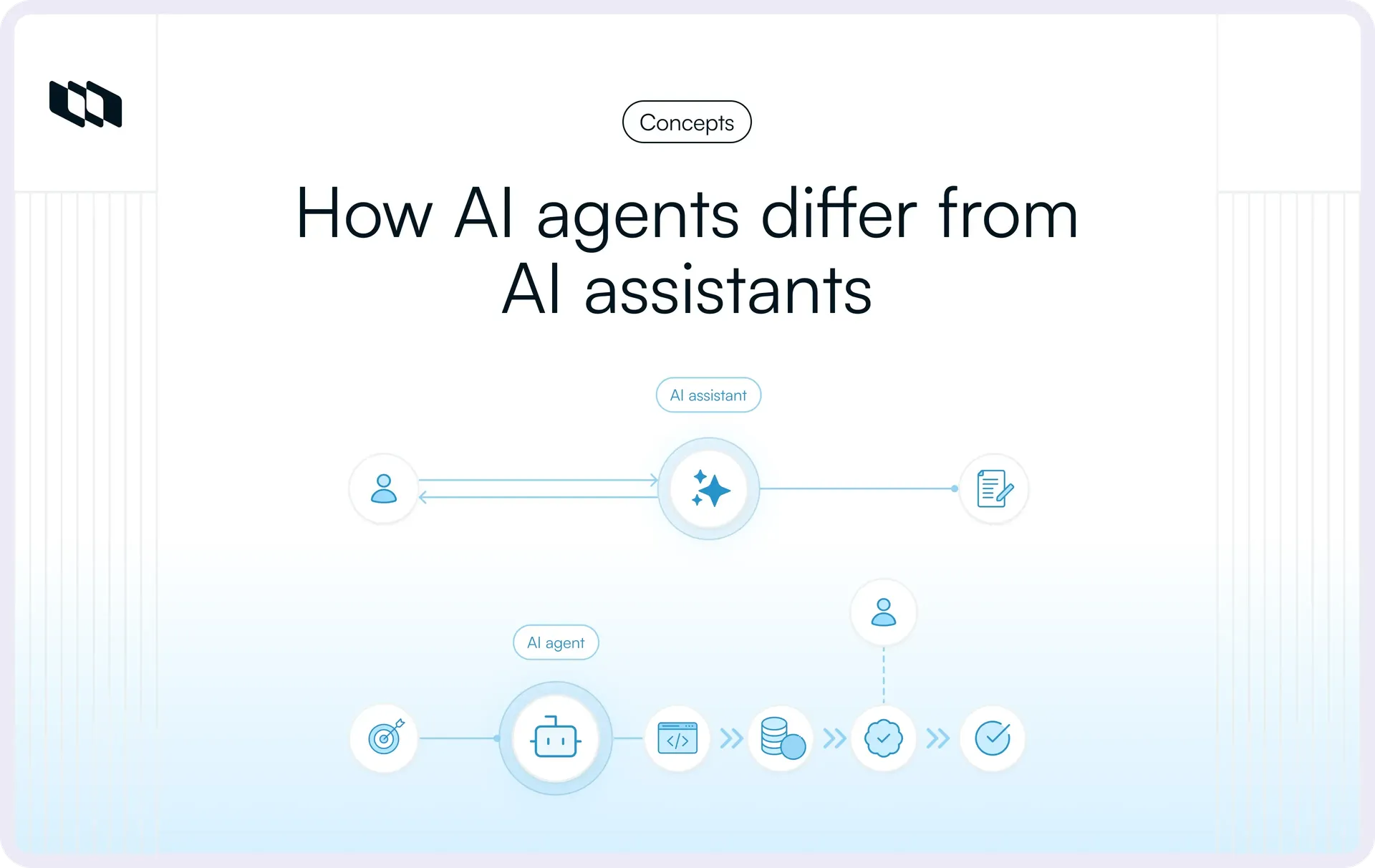
AI assistants and AI agents are built from the same parts: large language models, memory, retrieval, tools, APIs, and connections to business systems. So the line between them blurs fast.
The clearest way to tell them apart is to ask who controls the workflow after the first request. An AI assistant helps a person do the work. An AI agent takes a defined goal and carries it across multiple steps, choosing and running actions within set boundaries. This guide covers how each one works, where they differ, and how to pick the right one for a workflow.
What is an AI assistant?
An AI assistant is an AI system that helps a person complete tasks through questions, prompts, or direct instructions.
The person drives the workflow. They decide what they need, ask for help, review the response, and choose what happens next.
A product manager might ask an AI assistant to:
- Summarize customer feedback from a research document.
- Turn meeting notes into action items.
- Compare two approaches to a feature.
- Draft an acceptance criterion for a work item.
- Explain an unfamiliar technical concept.
- Analyze a dataset and surface patterns.
Modern assistants go well past text generation. Depending on the product and its permissions, an assistant may pull information from company systems, keep conversational context, call tools, inspect files, or take specific actions.
A system with all of those capabilities is still an assistant if a person directs the sequence of work. It becomes an agent when it manages that sequence itself.
How does an AI assistant work?
A typical AI assistant runs a user-directed loop:
User request → understand context → retrieve or generate → return output → human reviews or acts → next user instruction
Implementations vary, but the pattern usually goes like this:
- A user starts the task: The assistant receives a question, instruction, document, or other input.
- The system assembles context: That can include the current conversation, retrieved knowledge, files, application data, or user preferences.
- The model responds or takes a bounded action: It might answer a question, generate content, analyze information, or call an available tool.
- Control returns to the user: The person reviews the output and decides whether to continue, revise the request, or do something else.
What is an AI agent?
An AI agent is an AI-powered system that pursues a defined goal. It decides which actions are needed, uses the tools available to it, checks the results, and keeps going until it reaches an outcome, a stopping condition, or a point where it needs to escalate.
Instead of spelling out every action, a person defines the objective and the boundaries the agent works within.
Say an engineering manager wants every unresolved blocker summarized before the weekly delivery review. An assistant can write that summary once someone asks for it. An agent could run on a schedule: inspect the relevant projects, find unresolved blockers, gather their current status, prepare the summary, and create or update the right work item, with no prompt needed between steps.
What separates the two here is execution responsibility. The agent carries every step after the trigger.
How does an AI agent work?
Most agentic workflows follow a repeating loop:
Goal or trigger → plan → choose action or tool → execute → observe → adjust → continue, complete, or escalate
A typical run looks like this:
- The agent receives a goal or trigger. It could come from a user, a schedule, an application event, an API call, or another workflow.
- It works out what needs to happen. The agent may break the objective into smaller steps or pick the next action.
- It gathers context and picks tools. Depending on its permissions, it may pull project data, query another system, call an API, inspect a file, or use a specialized tool.
- It acts. That could mean creating or updating work, generating an artifact, changing a record, or calling another service.
- It observes the result. The outcome becomes context for the next decision.
- It adapts. It can stay on the planned path, try another approach, retry, stop, or ask a person to step in.
- It reaches an endpoint. The run ends when the goal is met, a boundary is hit, an approval is needed, or the agent can't safely continue.
This loop is why agents suit workflows that should keep moving without a person directing every step in between.
AI agent vs. AI assistant: What are the key differences?
The differences are easiest to see when you look at how work moves forward. Feature lists overlap too much to help.
Dimension | AI assistant | AI agent |
Primary role | Helps a person perform work | Pursues a defined outcome |
Typical trigger | User request | User request, event, schedule, or system trigger |
Autonomy | Primarily user-directed | Can operate with greater bounded autonomy |
Workflow control | Human generally decides each next step | Agent can determine intermediate steps |
Task scope | Individual or bounded tasks | Multi-step workflows |
Planning | Usually follows the user's instruction | Can plan or decompose a goal |
Tool use | Can use connected tools | Can select and coordinate tools during execution |
Actions | Primarily assists or performs bounded actions | Can perform actions across connected systems |
State | Often conversational or task context | Tracks workflow progress and execution state |
Human role | Driver and decision-maker | Goal setter, reviewer, approver, or exception handler |
Failure handling | User usually decides what to do next | Can retry, change approach, stop, or escalate |
Best fit | Productivity and decision support | Workflow execution and automation |
Autonomy and initiative
Autonomy is one of the most visible differences, and it sits on a spectrum.
An AI assistant usually works from direct instructions:
Summarize these customer interviews.
It does the task and returns the result.
An agent can take a broader objective:
Review new customer feedback each Friday and flag recurring issues that affect the onboarding experience.
Within its scope, the agent decides which feedback to look at, how to group related issues, when an issue crosses the threshold for escalation, and where to record the result.
It still works inside boundaries. More autonomy means it makes more of the in-between decisions itself, without the user specifying each one.
Workflow control
Workflow control is one of the most reliable ways to tell an AI agent from an AI assistant.
An assistant usually follows this pattern: Human → AI → human → AI
After each meaningful exchange, the person decides what comes next.
An agent can work differently:
Human defines goal and boundaries → agent manages intermediate steps → human reviews or steps in where required
This matters more as assistants pick up tools, memory, and multi-step reasoning. A system that calls an API still behaves like an assistant when the user directs each action. It becomes more agentic when it decides on its own that another action is needed and carries the workflow forward.
Task scope and execution
AI assistants handle bounded tasks well:
- Rewrite this release note.
- Explain this stack trace.
- Compare these two specifications.
- Summarize this sprint.
- Draft a project update.
Agents fit objectives that span several dependent steps:
- Review all incoming support requests and route qualifying bugs to engineering.
- Track a recurring delivery risk and update the project when its status changes.
- Prepare a weekly project-health summary using information from several systems.
- Investigate a failed deployment and create the appropriate follow-up work.
Complexity is a poor test for which is which. A hard math problem can take sophisticated reasoning and still be a single assistant request. A simple workflow, like checking a status and updating a record when a condition is met, can be agentic because the system controls the order of execution.
Tool use and actions
Both assistants and agents use tools. An assistant might query a knowledge base, search the web, run code, inspect a project, or pull information from another app.
What differs is where tool use sits in the workflow. For an assistant, a tool call is part of answering the current request. For an agent, choosing tools is part of an ongoing execution loop.
An engineering assistant might pull open issues when asked:
Which authentication issues are still unresolved?
An engineering agent preparing a release-readiness review might decide on its own to pull unresolved issues, check their dependencies, review recent changes, and update the readiness report.
Memory and state
Memory is another place where simple comparisons fall apart.
Modern assistants can hold conversational context, remember preferences, recall earlier information, and carry context across sessions.
Agents may use all of that, and they also need execution state. An agent working through a migration checklist has to know:
- Which steps have already been completed.
- Which actions failed.
- Which approval is still pending.
- What information a previous tool returned.
- Which condition should trigger the next action.
- Whether the workflow should resume after an interruption.
That state is what lets an agent pick a process back up and keep it moving.
Human involvement
With an assistant, the person stays involved throughout: asking, reviewing, refining, deciding, and continuing.
An agent shifts the person's role from hands-on operator to supervisor. A human might:
- Define the objective.
- Set permissions.
- Specify policies and limits.
- Approve sensitive actions.
- Handle exceptions.
- Review outcomes.
Less human interaction only counts as progress when the step never needed a person. Some decisions call for judgment, negotiation, context, or accountability that belongs with a person. The goal is to put human involvement where it adds value and add autonomy only where it helps.
Failure handling
When an assistant gets something wrong, you see it right away. The user corrects the prompt, adds context, or tries another approach.
Agent failures are messier because several actions may already have happened. A well-designed agent needs rules for when:
- A tool becomes unavailable.
- Required information is missing.
- A previous action produces an unexpected result.
- The agent reaches a permission boundary.
- Multiple possible paths exist.
- Repeated attempts fail.
- An action requires human approval.
Depending on the workflow, the agent might retry, try another permitted action, pause, stop, or escalate.
The more execution authority an agent has, the earlier failure handling needs to enter the product design.
What are AI assistants and AI agents used for?
The right model depends on what kind of work you're handing off.
Common AI assistant use cases
Assistants work best when a person still needs to shape the work or make the important calls. Common uses:
- Finding relevant information and answering research questions
- Drafting and editing specifications, updates, documentation, emails, and reports
- Summarizing meetings, documents, customer feedback, or project activity
- Answering questions from internal documentation or workspace context
- Analyzing data and explaining patterns
- Explaining code, generating snippets, reviewing changes, or suggesting fixes
- Comparing options, laying out trade-offs, and structuring an analysis
Each of these gets faster synthesis while the person keeps control of the outcome.
Common AI agent use cases
Agents earn their keep when the work involves repeated execution or coordination across several steps and needs to keep moving between prompts:
- Triaging incoming requests and routing them by defined criteria
- Monitoring workflows for changes and responding when a condition is met
- Engineering operations: gathering diagnostic context, updating incidents, and handling routine follow-ups
- Delivery management: inspecting project state and surfacing risks or overdue dependencies
- Taking scoped coding tasks through execution and returning the result
- Gathering information from several sources to keep a recurring report current
- Moving or reconciling information between connected applications
Why do businesses use each?
AI assistants mainly increase individual leverage. A PM can analyze research faster. An engineering manager can summarize a delivery review. A founder can question a set of operating metrics without building every view by hand.
Agents go after a different kind of friction: coordination and execution overhead. When a process has someone repeatedly checking a system, gathering information, applying rules, updating another system, and following up later, an agent can take on more of that sequence. The better fit depends on which of these two bottlenecks is slowing your team down.
When should you use an AI assistant vs. an AI agent?
Start with the workflow, then pick the technology.
Use an AI assistant when:
- The work begins with a direct user request.
- The task is exploratory, creative, or ambiguous.
- Human judgment changes the direction frequently.
- The main output is information, analysis, content, or recommendations.
- The task wraps up after one or a few interactions.
- A person should control each consequential step.
- Automating the workflow would cost more than the coordination it saves.
An assistant is often the better choice when the hard part of the work is thinking with the user.
Use an AI agent when:
- The desired outcome can be clearly defined.
- Several connected actions must happen before the work is complete.
- The workflow needs to keep going without a prompt at every stage.
- Multiple tools, systems, or data sources are involved.
- Repetitive coordination eats meaningful time.
- Success criteria and stopping conditions can be written down.
- The agent can be given narrow permissions.
- Exceptions can be routed to a human.
An agent fits better when the hard part is carrying a known process forward consistently.
What should you ask before choosing?
These seven questions usually show whether a workflow really needs an agent:
- Who should decide the next step? If it's usually a person, an assistant may be enough.
- Is this a task or a process? Single outputs point to an assistant. Ongoing multi-step work makes a stronger case for an agent.
- Does the AI need to inform or act? Recommendations need far less execution infrastructure than changes to real systems.
- How many systems are involved? More systems raise both the potential value of an agent and its operational complexity.
- Where does human judgment matter? Find the points that need approval, interpretation, negotiation, or accountability.
- What happens when the workflow goes off the happy path? Define retries, stopping rules, escalation, and recovery before you add autonomy.
- Can permissions be tightly scoped? Give an agent the access its job needs and hold back access it might only use someday.
Working through these also guards against a common mistake: building an agent for a problem that a deterministic rule or a simple assistant interaction would solve more reliably.
Can AI assistants and AI agents work together?
Yes. Many useful AI systems combine both.
An assistant gives the person a conversational way to explain what they need. Once the objective is clear, an agent takes on the parts of the workflow that are safe to delegate.
A typical pattern:
User → AI assistant → defined goal → AI agent → tools and systems → result → assistant or human review
Say a product manager asks: Help me understand why this release is slipping.
The assistant helps explore the problem, surfaces the relevant work, and sharpens the question.
Then the PM asks for something ongoing: Track these dependencies until the release is complete and flag any new blocker.
An agent owns that bounded workflow, and the assistant stays in place to ask questions and review progress.
The pairing works because each one solves a different problem. The assistant helps people work with information and make decisions. The agent keeps work moving once those decisions are made.
Where does human-in-the-loop AI fit?
Human-in-the-loop AI sits between fully user-directed assistance and high-autonomy agent execution. The agent handles the routine parts of a workflow, and a person stays responsible for specific decisions.
For example, an agent might be allowed to:
- Review an incoming customer request.
- Gather relevant account and project context.
- Classify the request.
- Prepare the proposed action.
- Ask a human to approve it.
- Execute the approved change.
- Record the outcome.
Human checkpoints are especially useful for:
- High-impact changes
- Financial or contractual actions
- Publishing or external communication
- Security-sensitive operations
- Low-confidence decisions
- Exceptions outside the normal workflow
- Irreversible actions
The spectrum runs: AI assistant → agent with approval checkpoints → higher-autonomy agent
A single workflow can sit at different points on it. Routine updates might run automatically, while changes to scope, budget, access, or production systems still need approval.
What are the limitations and risks of AI assistants and AI agents?
Assistants and agents share some underlying AI risks. Agents add operational consequences because they act.
AI assistant limitations
1. They still require coordination
An assistant can save a lot of time on individual steps and still leave the user moving information and work between those steps. If someone has to copy the output elsewhere, update the project, and remember to follow up later, the assistant sped up part of the workflow and left the rest manual.
2. Outputs can be incorrect
Generated answers can include factual mistakes, unsupported assumptions, or missing context. Workflows need verification, especially when AI output feeds consequential decisions.
3. Available context may be incomplete
An assistant can only reason over what it can access. A technically strong answer can still be operationally wrong when the relevant project state, dependency, decision, or policy lives outside its context.
4. Long-running work is hard to manage in a chat
Chat is good for interaction, but persistent processes need durable state. Once work spans several days, systems, owners, or dependencies, a chat thread makes a weak source of operational truth.
AI agent limitations and risks
1. Errors can become actions
Someone can review a wrong assistant answer before acting on it. An agent with write access can turn a wrong interpretation into a real system change. That makes scoped permissions, validation, and approval gates far more important.
2. Mistakes can compound
In a multi-step workflow, decisions depend on each other. If the agent misreads an early result, later actions build on that error. Reliable agent systems need ways to validate outcomes, spot divergence, and stop before the error spreads.
3. Tools create external dependencies
Agents depend on APIs, authentication, network availability, schemas, permissions, and third-party systems. A good plan can still fail because something in that environment changed.
4. Autonomy can increase resource usage
Longer workflows can mean repeated reasoning, retrieval, and tool calls. Teams need execution limits so an agent can't run an unproductive loop indefinitely.
5. Permissions need careful design
A useful agent usually needs access to real systems, and every added permission widens what it can affect. Tie access to the agent's specific role and scope.
6. Complex workflows are harder to observe
When several decisions and tool calls happen before a result appears, teams need to see what happened along the way. Without that trace, diagnosing failures or reviewing unexpected actions gets much harder.
How should teams govern AI agents?
Governance starts to matter once AI moves from helping someone decide to taking part in execution. A practical model covers six areas.
1. Define permissions and access
Give each agent only the data and actions its role requires. An agent that summarizes project health may need read access across several projects and no ability to change work. An intake-triage agent may need to update labels and assignments while staying unable to delete work.
2. Set operating boundaries
Define what the agent can decide on its own. Useful boundaries include:
- Project or workspace scope
- Permitted tools
- Allowed action types
- Maximum workflow duration
- Conditions that require escalation
- Actions that always require approval
3. Add approval checkpoints
Put human approval where the cost of a wrong action justifies it. Approval gates help most before:
- Changing production systems
- Sending sensitive external communication
- Modifying access or permissions
- Closing high-impact work
- Changing financial data
- Performing irreversible actions
Aim oversight at the risky steps and let the routine ones run.
4. Make agent activity observable
Teams should be able to see:
- What triggered the run
- What context the agent received
- Which tools it used
- Which actions it performed
- Which decisions required approval
- Where the workflow failed or stopped
- What final state it produced
5. Plan for failure and escalation
Agents need clear off-ramps. Define what happens when:
- A tool fails repeatedly.
- Required context is unavailable.
- Confidence is too low.
- The workflow enters an unknown state.
- Permission is denied.
- A decision falls outside policy.
Often the right move for an agent is to stop and ask for help.
6. Control execution cost
One request can set off many operations. Set limits on model usage, retries, tool calls, duration, and recursive behavior so the work stays in proportion to the goal.
Are AI assistants and AI agents becoming harder to distinguish?
Yes. Capabilities that once looked agent-specific keep showing up in assistants. Modern assistants may have:
- Persistent context
- Memory
- Retrieval
- Web access
- Tool calling
- File operations
- Multi-step reasoning
- Connected application access
Agents, for their part, can still work conversationally, pause for approval, and ask people for missing information.
That has worn down several common rules of thumb:
- "Agents use tools." Assistants use tools too.
- "Agents have memory." Assistants can retain context and memory too.
- "Assistants use chat." Agents can have a conversational interface.
- "Agents complete complex tasks." An assistant can solve a complex problem and still hand control back after one exchange.
A sturdier test is execution ownership:
- Who decides the next action?
- Can the system continue without another user request?
- Can it change real workflow state?
- Can it adapt when an intermediate result changes the plan?
- What boundaries decide when it must stop or ask for help?
These questions still work when vendors use assistant, copilot, and agent to mean different things.
AI agent vs. AI assistant: Which one is better?
It depends on the work.
An AI assistant is usually the stronger choice when human judgment is part of the value. Research, planning, writing, analysis, design exploration, and decision support all benefit from frequent back-and-forth between a person and the model.
An AI agent earns its place when the outcome is clear and the friction comes from execution: checking systems, coordinating steps, tracking state, following rules, and moving work forward.
More autonomy also brings more operational responsibility. So the useful question for any workflow is which parts you can safely delegate, and where a person should stay in control.
How do AI assistants and agents work in Plane?
Plane keeps assistant-style interaction and agent-led execution separate.
Plane AI is a workspace-level assistant. Teams can ask questions about their work, summarize activity, and draft work from workspace context. Plane also supports AI-assisted experiences inside Pages.
Plane Agents are native agents that work on the same projects and work items as the team. Their instructions, project scope, read and write boundaries, and work context live right alongside the work they act on. Plane positions them for bounded jobs like triaging requests, preparing specifications, summarizing activity, inspecting delivery risk, and other recurring workflows.
That split follows the same principle as the rest of this guide:
- Use an assistant when a person needs to explore, ask, refine, or decide.
- Use an agent when a defined piece of work should keep moving inside agreed boundaries.
- Keep approvals and human intervention where the consequences call for them.
Agent credits come with Pro and Business workspaces, and Enterprise workspaces get unmetered BYOK usage.
If your team is working out how assistants and agents fit into your existing project workflows, Talk to sales.
Final thoughts
The difference between an AI agent and an AI assistant comes down to who carries the workflow from one step to the next.
Assistants help people understand information, create outputs, and make decisions, with the user closely involved. Agents take on more of the execution: tracking state, choosing intermediate actions, using tools, and moving toward a defined outcome within their boundaries.
Start with how much judgment, autonomy, risk, and continuity the workflow needs, then pick the model that fits.
Frequently asked questions
Q1. What is the main difference between an AI agent and an AI assistant?
An AI assistant helps a user perform a task and usually hands control back after each meaningful exchange. An AI agent can keep working toward a defined goal across multiple steps, choosing and running actions within its permissions and boundaries.
The clearest line between them is workflow control. Single capabilities like memory or tool use show up in both.
Q2. Is ChatGPT an AI agent or an AI assistant?
ChatGPT can support assistant-style workflows and, depending on the capabilities and mode enabled, more agentic ones. The label depends on how it's used.
When the user directs each step through prompts and responses, it behaves like an assistant. When it takes a broader objective and manages several permitted actions toward it on its own, it behaves more like an agent.
Q3. Can an AI assistant become an AI agent?
Yes. The distinction is architectural, so it can change.
An assistant becomes more agentic when it gains the ability to track workflow state, plan intermediate steps, pick tools, take actions, observe results, and keep moving toward a goal without a new instruction after every step.
Q4. Are AI agents fully autonomous?
They don't have to be.
Agents run at different levels of autonomy. Some handle routine steps on their own and need approval for sensitive actions. Others work only inside a tightly defined workflow and escalate whenever they hit an exception.
In production, bounded autonomy is usually more useful than unrestricted autonomy.
Q5. What is the difference between an AI agent, AI assistant, chatbot, and copilot?
A chatbot mainly holds conversations. An AI assistant helps a user perform work. A copilot usually means an assistant built into a specific application or workflow. An AI agent pursues a goal and carries out execution across multiple actions with more independence.
Products use these labels inconsistently, so judge a system by what it actually does.
Recommended for you



 Download for Mac
 Download for Android