Bug severity vs. priority in testing: Key differences
Introduction
Bug triage separates functional engineering teams from chaotic ones. When a defect surfaces, two questions matter immediately: how bad is it, and how soon does it need fixing? Bug severity and bug priority answer different questions; confusing the two leads to misallocated resources, delayed releases, and frustrated stakeholders. This post clearly breaks down both concepts, so your QA and engineering teams can make smarter, faster decisions every time.
Bug severity vs. priority
Understanding bug severity vs priority in testing starts with recognizing that both describe different dimensions of a defect. Severity explains product impact. Priority defines execution urgency. Together, they help teams decide risk exposure and sequencing during bug triage and release planning.
What is bug severity?
Bug severity describes how strongly a defect affects system functionality, stability, performance, or user experience. It helps teams evaluate product risk and technical impact before deciding resolution timelines. In software testing, severity vs. priority: severity answers one question: "How badly does this bug affect the product?"
Examples:
- System crash during login
- Blocked workflows in checkout or onboarding
- Incorrect outputs in reporting dashboards
- Cosmetic issues, such as layout misalignment
Severity levels guide engineering teams in understanding which defects threaten usability, reliability, or delivery readiness.
What is bug priority?
Bug priority describes how urgently a defect should be resolved based on business context, release timing, and customer visibility. It helps teams decide the order of fixes during sprint planning and bug triage workflows.
In bug tracking, severity and priority address different questions: "How severe is this bug?" and "How soon should this bug be fixed?"
Examples:
- Payment bug before launch
- Typo on homepage during campaign rollout
- Issue in the rarely used settings page
Priority ensures engineering effort aligns with release risk, stakeholder expectations, and customer-facing impact.
Severity vs. priority in one sentence
Severity measures impact. Priority determines fix order.
These two inputs together drive every effective bug triage process for engineering teams, and keeping them separate ensures the right bugs get fixed at the right time for the right reasons.
Bug severity vs. priority: A comparison
A clear comparison helps teams consistently apply bug severity vs. priority in testing during defect classification and release planning. Severity reflects technical impact on product behavior. Priority reflects business urgency and the importance of scheduling within delivery timelines.
Aspect | Bug severity | Bug priority |
Definition | Measures the level of impact a defect has on system functionality, stability, performance, or usability | Determines how quickly a defect should be resolved based on delivery urgency and business context |
Focus area | Technical impact on product behavior | Business urgency and execution sequencing |
Decision drivers | Workflow blockage, data integrity risk, system reliability, feature usability | Release timelines, customer visibility, revenue impact, stakeholder expectations |
Ownership | Typically assigned by QA engineers or testing teams | Typically aligned by product managers, engineering leads, and delivery stakeholders |
Stability over time | Remains relatively consistent once the impact is understood | Can change based on release stage, customer needs, or planning priorities |
Relationship to releases | Indicates whether a defect threatens functional readiness | Determines whether a defect must be fixed before a milestone or scheduled later |
Example decision question | How severely does this bug affect the product experience? | How urgently should this bug be fixed in the delivery cycle? |
In severity vs. priority in software testing, severity signals product risk exposure, while priority determines execution order during sprint planning, bug triage, and release coordination.
What bug severity means in software testing
Severity is the foundation of any credible QA process. Before a team can decide what to fix, they need an honest assessment of what is actually broken and how badly. That is what severity classification delivers.
Why severity matters
Without a clear severity framework, engineering teams treat every bug as equally urgent or equally ignorable. Both outcomes are costly. A critical failure buried under a backlog of low-impact tickets delays releases and erodes product quality. A cosmetic issue escalated into a blocker, wasting sprint capacity that should have gone elsewhere.
Severity in software testing supports four critical functions:
- Risk assessment: Teams understand which bugs pose a real threat to product stability, data integrity, or user trust before making release decisions.
- Release readiness: Severity signals whether a build is shippable. A release with open critical-severity bugs should wait.
- Defect grouping: Grouping bugs by severity gives QA leads a structured view of the health of a feature, module, or release candidate.
- Escalation decisions: High-severity bugs trigger immediate escalation to engineering leadership or cross-functional stakeholders. Low-severity bugs follow the standard workflow.
Common bug severity levels
Most engineering teams work with four severity tiers. The labels may vary across tools and organizations, but the underlying logic is consistent.
Severity level | What it means | Examples |
Critical | The system is broken, unusable, or at risk of data loss | App crashes on launch, complete login failure, data corruption |
High/Major | The core feature is impaired, but a workaround exists | Export function fails, bulk action partially works |
Medium | Incorrect behavior with limited disruption to core workflows | Wrong sort order, inaccurate filter results |
Low/Minor | Cosmetic or formatting issue with no functional impact | Spacing misalignment, icon rendering inconsistency |
How teams determine severity
Severity assessment is a technical judgment, and it should be based on consistent criteria rather than gut feel. These are the evaluation parameters that matter:
- Feature importance: Is the affected feature central to the product's core value, or does it sit in a secondary workflow?
- Workflow blockage: Does the bug prevent a user from completing a task entirely, or does it create friction without blocking progress?
- Number of users affected: Does the bug surface for all users, a specific segment, or only under rare conditions?
- Reproducibility: Is the bug consistent and reliably reproducible, or intermittent? Consistent bugs carry higher severity by default.
- Data integrity impact: Does the bug corrupt, delete, or misrepresent data? Any data integrity risk immediately elevates severity.
- Availability of a workaround: A bug with a clear, low-effort workaround carries lower severity than one that leaves users completely stuck.
Examples of severity levels in real workflows
Abstract definitions only go so far. Here is how severity maps to real defects engineering teams encounter:
- Critical — Login failure: Users cannot authenticate into the product. Every downstream workflow is blocked. No workaround exists. This is a release blocker requiring immediate escalation.
- High — Export function is broken: Users can access and work with their data within the product, but cannot export it. Core functionality is impaired. A workaround may exist through alternate download paths, but the feature is effectively unusable in its intended form.
- Medium — Incorrect sorting behavior: A list view sorts by the wrong parameter under specific conditions. Users can still access all data and complete their tasks, but the experience is degraded, and trust in data accuracy is affected.
- Low — Spacing misalignment: A UI element renders with inconsistent padding on a specific screen size. Functionality is intact. The issue is visual and affects polish, but carries no workflow or data impact.
What bug priority means in software testing
Severity tells you what is broken. Priority tells you what gets fixed first. In any active sprint, engineering teams carry more open bugs than available capacity. Priority is the mechanism that turns a cluttered backlog into an executable fix schedule.
Why priority matters
Every engineering team operates under constraints, limited sprint capacity, fixed release windows, and competing demands from product, support, and leadership. Priority determines the decision logic that decides which bugs get engineering attention now and which get scheduled for later.
Without a clear priority framework, fix order defaults to whoever shouted loudest or filed the ticket most recently. That is not a system. It is noise.
Priority in bug triage supports four critical functions:
- Sprint planning: Priority determines which bugs enter the current sprint and which move to the backlog. It keeps teams focused on work that actually moves the release forward.
- Release readiness: Open P1 bugs are release blockers. Open P3 bugs are not. Priority gives engineering leads a clear signal on whether a build is ready to ship.
- Stakeholder alignment: Prioritize communicating fixed timelines to PMs, customers, and leadership without requiring a deep technical explanation of every defect.
- Customer impact mitigation: High-priority bugs affecting active, high-value users get addressed before lower-visibility issues, protecting retention and trust.
Common bug priority levels
Priority levels are typically labeled P1 through P4, though naming conventions vary across teams, tools, and organizations. The logic behind each tier is consistent regardless of the label used.
Priority Level | What it means | Typical response |
P1 / Critical | Must be fixed immediately, release cannot proceed | Same-day fix, immediate engineering escalation |
P2 / High | Fix required in the current sprint or before the next release | Scheduled within an active sprint, tracked closely |
P3 / Medium | A fix is needed, but not immediately urgent | Backlogged for an upcoming sprint |
P4 / Low | Fix is desirable but carries minimal business risk | Addressed when capacity allows |
How teams determine priority
Unlike severity, which is a technical assessment, priority is a business judgment. These are the decision signals that drive it:
- Release deadlines: A bug that would be P3 in a normal sprint becomes P1 three days before a major release if it affects a core user flow.
- Customer visibility: Bugs on high-traffic pages, onboarding flows, or primary dashboards carry a higher priority because more users encounter them.
- Revenue impact: Any defect that affects payments, subscriptions, upgrades, or billing gets elevated priority regardless of its technical severity.
- Compliance exposure: Bugs that create regulatory, legal, or data privacy risk are prioritized immediately, often outside normal sprint processes.
- Contractual commitments: Enterprise customers with SLA agreements may require specific bugs to be resolved within defined timeframes, making priority a contractual obligation.
- Brand risk: A bug visible on a public-facing page, in a demo environment, or during a sales process carries reputational weight, elevating its priority beyond its functional impact.
Examples of priority levels in practice
- P1 — Check out the issue before release: A payment flow bug surfaces two days before a scheduled product launch. Users cannot complete purchases. Revenue impact is direct and immediate. This is a P1 regardless of the fix's technical complexity. The release does not ship until it is resolved.
- P2 / P3 — Bug in a secondary workflow: A filter in the reporting module returns inconsistent results under specific conditions. The core product experience is intact, but the issue affects a workflow that a meaningful segment of users relies on. It enters the next sprint as a P2 or P3, depending on user volume and business context.
- P4 — Typo in an internal admin panel: A label in an internal-only settings screen has a spelling error. No external user ever sees it. Functionality is completely unaffected. This is a P4, logged, acknowledged, and fixed when capacity is available.
Who decides bug severity and priority?
Clear ownership helps teams consistently apply bug severity vs. priority in testing across triage workflows. Severity reflects technical impact, while priority reflects delivery urgency; both require input from different roles within the product organization.
- In most teams, bug severity is assigned by QA engineers or testing specialists, who evaluate how severely a defect affects functionality, stability, and execution reliability across workflows. Their assessment ensures defects receive accurate impact classification before planning decisions begin.
- Bug priority is typically aligned through collaboration among product managers, engineering leads, and delivery stakeholders, as urgency depends on release timelines, customer visibility, and business exposure. This shared evaluation helps teams schedule fixes in the correct order within sprint plans and release milestones.
- Strong teams treat severity and priority in bug tracking as coordinated decisions rather than isolated labels. QA contributes context on technical impact, while product and engineering leaders provide insight into delivery sequencing. This collaboration improves consistency across triage meetings and supports clearer decisions in the severity vs. priority matrix in software testing workflows.
Why severity and priority are not the same
Understanding the difference between impact and urgency is central to correctly applying bug severity and priority in testing. Severity reflects how strongly a defect affects product behavior. Priority reflects how quickly the team should resolve the issue within delivery timelines. These signals guide different decisions during bug triage and release planning.
1. High severity does not always mean high priority
A defect can have a significant technical impact while affecting only a limited environment or a small group of users. In this situation, severity remains high because the issue affects functional reliability, while priority shifts based on delivery context.
Example: critical bug in legacy browser with low usage
Engineering teams still classify the issue as severe because it affects system behavior. Product teams schedule resolution based on adoption patterns, release timing, and customer exposure. This distinction improves classification accuracy in the severity vs. priority matrix in software testing workflows.
2. Low severity can still be a high priority
A defect with limited technical impact can still require immediate resolution when it appears in high-visibility user journeys. Priority increases because business exposure increases.
Example: minor UI defect on pricing page during campaign launch
The issue affects brand perception and conversion experience, which raises urgency even though functionality remains intact. This scenario frequently arises in bug-tracking decisions during launch windows, particularly regarding severity and priority.
Why teams often confuse severity and priority
This confusion is widespread, and it persists across experienced teams. These are the root causes:
- Unclear classification guidelines: When there is no documented definition of what constitutes a P1 versus critical severity, teams fill the gap with personal judgment, leading to inconsistent outcomes at scale.
- Shared triage ownership: When everyone owns triage, no one owns it precisely. Severity gets assigned by whoever filed the ticket. Priority gets assumed from severity. The distinction collapses.
- Deadline pressure: Under release pressure, teams conflate urgency with impact. Everything feels like P1 when launch is 48 hours away, which makes P1 meaningless as a classification.
- Tool limitations: Some defect-tracking tools present severity and priority as a single field or use the terms interchangeably by default, embedding confusion directly into the workflow.
- Inconsistent team conventions: A QA engineer who has worked at three previous companies may hold three different mental models of what "high severity" means. Without a shared, documented standard, these definitions drift across teams and over time.
The fix for all of these is the same: explicit, documented classification criteria that the entire team agrees on, enforced by a consistent triage process and a single defect-tracking system.
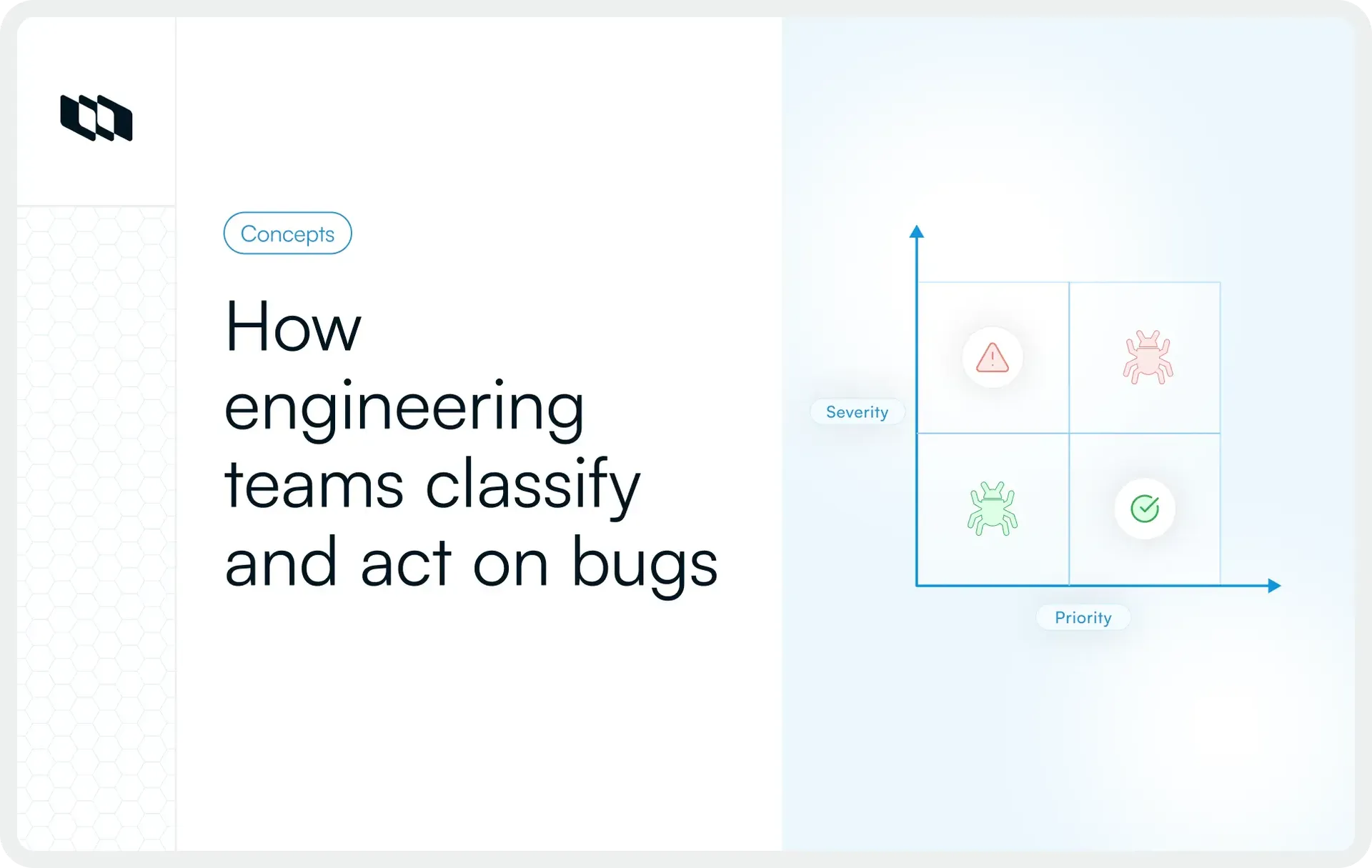
Bug severity vs. priority matrix
Teams use a severity–priority matrix to translate impact and urgency into clear execution decisions. The matrix helps QA, engineering, and product leaders align quickly during bug triage severity vs. priority discussions by mapping defects into four predictable resolution paths. This structure improves planning accuracy across releases and supports consistent classification in severity vs. priority in software testing workflows.
1. High severity + high priority
These defects affect critical workflows and require immediate attention to protect product reliability and release readiness, for example: login failure in the production environment
Such issues block access to core functionality and increase operational risk, placing them at the top of the resolution queue in bug-tracking decisions based on severity and priority.
2. High severity + low priority
These defects have a significant technical impact in limited environments or low-usage scenarios. Engineering teams classify them as severe, while delivery teams schedule resolution based on adoption patterns and release timelines. For example, a critical defect in a rarely used environment
The issue affects system behavior yet creates limited exposure across active users, which shifts scheduling decisions within the severity vs. priority matrix in software testing.
3. Low severity + high priority
These defects create minimal functional disruption yet appear in high-visibility user journeys that influence adoption or conversion outcomes. For example, a homepage typo before product launch. Customer exposure increases urgency, even though system behavior remains stable, thereby raising the resolution priority during release preparation.
4. Low severity + low priority
These defects affect cosmetic presentation or secondary workflows with limited operational impact. Teams typically schedule resolution during later improvement cycles. For example, a minor styling issue in the settings page. Such issues remain visible in backlog planning views, supporting structured prioritization across iterative delivery cycles.
What every bug report should include
Clear bug reports improve classification accuracy for bug severity vs. priority in testing by giving QA, engineering, and product teams the context needed to quickly evaluate impact and urgency. Structured reporting reduces interpretation gaps during triage meetings and supports consistent decisions across releases.
A complete bug report typically includes:
- Bug summary: A concise description that explains the issue and affected workflow
- Steps to reproduce: A repeatable sequence that allows teams to validate the defect reliably
- Expected result: The intended system behavior according to requirements or design logic
- Actual result: The observed behavior that reflects the defect
- Environment details: Browser, device, operating system, version, or deployment stage where the issue appears
- Screenshots or recordings: Visual evidence that improves reproduction speed and shared understanding
- Severity: Classification of technical impact on functionality, stability, or usability
- Priority: Scheduling urgency aligned with release timelines and customer exposure
- Assignee: Owner responsible for investigation or resolution
- Status: Current lifecycle stage within the tracking workflow
Structured documentation strengthens severity and priority in bug tracking by making the impact visible and urgency easier to evaluate. Teams classify defects faster, reduce clarification cycles during triage, and maintain stronger alignment across delivery planning and release readiness decisions.
Common mistakes teams make when assigning severity and priority
Accurate classification improves decision quality in bug severity vs. priority in testing, yet teams often introduce inconsistencies during triage when impact and urgency signals overlap. These mistakes reduce planning clarity and weaken confidence in releases across engineering workflows.
1. Treating severity and priority as identical
Severity reflects technical impact. Priority reflects delivery urgency. When teams apply them as interchangeable labels, defect queues lose structure and triage decisions become harder to sequence across releases.
2. Marking everything high priority
Excessive high-priority tagging reduces visibility into truly urgent defects. Engineering effort is spread across competing issues rather than focusing on workflow-critical problems identified by severity and priority in bug tracking.
3. Ignoring business context
Priority decisions depend on customer exposure, release timing, and stakeholder commitments. Classification without delivery context weakens alignment between product strategy and execution sequencing.
4. Ignoring technical impact
Severity classification requires evaluation of workflow blockage, stability risk, and data integrity exposure. Impact signals guide escalation decisions during severity vs. priority in software testing discussions.
5. Skipping reproduction verification
Reliable reproduction confirms whether a defect affects isolated environments or broader execution paths. Verified impact improves consistency across severity levels and strengthens triage accuracy.
6. Failing to revisit the priority before release
Priority evolves as milestones approach and customer-facing exposure increases. Re-evaluating urgency during release preparation improves planning accuracy and supports stronger outcomes in bug triage severity vs. priority workflows.
Best practices for classifying bugs consistently
Consistent classification improves decision quality for bug severity vs. priority in testing by helping teams evaluate impact and urgency using shared criteria. Structured practices improve triage speed, reduce ambiguity across roles, and support predictable planning across releases.
1. Define severity levels clearly
Document severity definitions with examples tied to workflow impact, stability exposure, and usability disruption. Shared definitions help QA teams apply impact classification consistently across environments.
2. Document priority guidelines
Priority decisions benefit from clear alignment with release milestones, customer visibility, and delivery commitments. Documented urgency signals improve scheduling accuracy by accounting for severity and priority in bug-tracking workflows.
3. Align QA and product expectations
QA evaluates functional impact while product teams evaluate delivery urgency. Alignment between these perspectives improves classification quality when distinguishing severity from priority in software testing discussions.
4. Review classifications during triage meetings
Triage meetings provide a structured forum for validating severity signals and confirming the urgency of execution. Collaborative review improves consistency across cross-functional teams.
5. Update priority as release context changes
Priority reflects delivery timing and customer exposure. Revisiting urgency before milestones leads to stronger planning outcomes and better sequencing across iterations.
6. Standardize classification across teams
Shared severity and priority frameworks improve reporting quality across projects and repositories. Standardization strengthens traceability and supports clearer decision-making in the severity vs. priority matrix in software testing workflows.
Final thoughts
Clear classification improves the quality of decisions teams make during bug triage, sprint planning, and release preparation. Bug severity vs. priority in testing helps teams separate technical impact from delivery urgency, creating stronger alignment across QA, engineering, and product workflows.
Severity explains how strongly a defect affects system behavior. Priority determines when teams should address it within execution timelines. Using both signals together improves planning accuracy, reduces escalation friction, and supports predictable release readiness across complex delivery cycles.
Frequently asked questions
Q1. What are P1, P2, P3 bugs?
P1, P2, and P3 bugs represent priority levels that indicate how urgently a defect should be resolved within delivery timelines.
- P1 bugs affect critical workflows such as login, checkout, or system stability and require immediate resolution before release.
- P2 bugs affect important functionality but allow partial execution through workarounds and are usually fixed within the current sprint cycle.
- P3 bugs affect secondary workflows or limited user scenarios and are scheduled based on available capacity in upcoming iterations.
Priority levels help teams sequence fixes effectively by considering severity and priority in bug-tracking workflows.
Q2. Who will decide the severity and priority of a bug?
Severity is typically assigned by QA engineers because they evaluate technical impact on system behavior, workflow continuity, and stability. Priority is determined collaboratively by product managers, engineering leads, and stakeholders based on release timelines, customer exposure, and delivery commitments.
This shared responsibility improves classification accuracy during bug severity vs. priority in testing decisions and supports consistent triage outcomes.
Q3. What is an example of severity and priority?
A login failure in production represents high severity and high priority because it blocks access to the system and affects all users. A formatting issue on an internal settings page represents low severity and low priority because it affects presentation rather than functionality.
These combinations illustrate how teams apply the severity vs. priority matrix in software testing to determine the order of resolution.
Q4. What are severity 1 and 2 defects?
- Severity 1 defects affect core system functionality and cause major workflow disruption, such as application crashes, authentication failures, or data corruption. These issues require immediate investigation due to their strong impact on release readiness.
- Severity 2 defects affect important features, with partial execution still possible through workarounds. These issues require timely resolution within planned delivery cycles.
- Severity classification helps teams evaluate technical impact before assigning urgency in testing workflows, distinguishing severity from priority.
Q5. What is the difference between bug priority and bug severity?
Bug severity measures the impact a defect has on functionality, stability, and user experience. Bug priority determines how quickly the defect should be resolved based on delivery timelines, customer exposure, and business risk.
Severity reflects technical impact. Priority determines fix order. Together, they guide structured decisions across bug triage severity vs. priority workflows.
Recommended for you



 Download for Mac
 Download for Android