What is Kanplan? How it works and when to use it
Introduction
Teams often find themselves choosing between the flexibility of Kanban and the planning structure of Scrum. As projects grow, managing incoming requests, feature ideas, bugs, and priorities on a single board becomes increasingly difficult. This is where Kanplan comes in. Kanplan combines visual workflow management with structured backlog management, helping teams plan work without sacrificing continuous flow. In this guide, you'll learn what Kanplan is, how the Kanplan methodology works, how it compares with Kanban and Scrum, and when teams should use it.
What is Kanplan?
As teams grow, so does the amount of work they need to manage. Feature requests, bug reports, technical debt, customer feedback, and strategic initiatives often compete for attention. While Kanban helps teams visualize and manage active work, many teams eventually need a better way to organize upcoming work before it enters execution. This need led to the emergence of Kanplan, a workflow approach that combines continuous delivery with structured planning.
Defining Kanplan
Kanplan is an Agile workflow management approach that combines the visual workflow of Kanban with backlog management practices commonly associated with Scrum. It helps teams maintain a prioritized backlog of future work while continuing to execute tasks through a pull-based workflow.
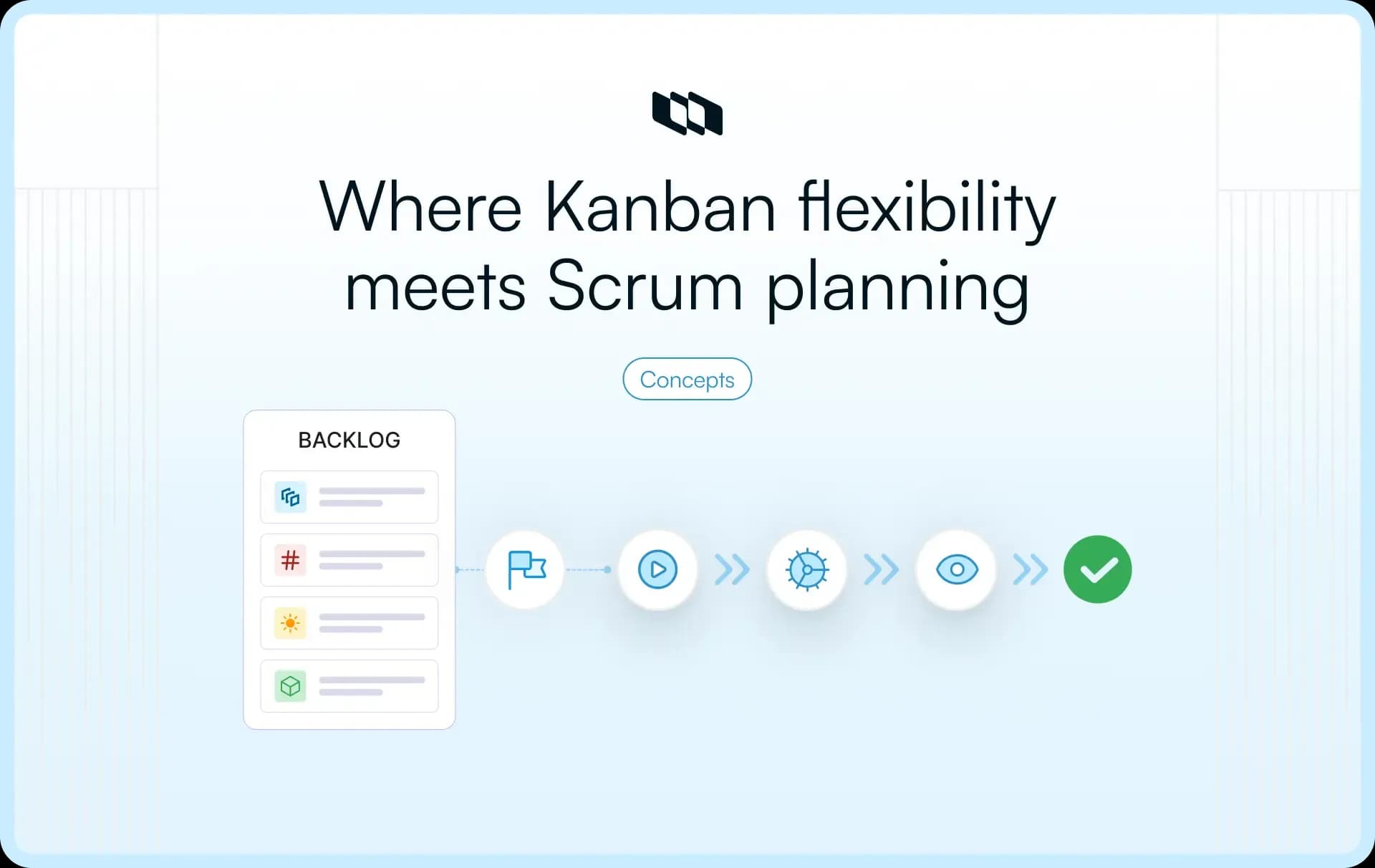
In a Kanplan system, work items first enter a backlog where they are reviewed, refined, and prioritized. Once a task is ready for execution, it moves onto the Kanban board and progresses through defined workflow stages. This approach allows teams to continuously manage priorities while maintaining a steady flow of delivery.
Where Kanplan came from
Kanplan emerged as an extension of Kanban to address a common challenge faced by growing teams: planning future work. Traditional Kanban focuses on managing work that is already in progress and visualizing its movement through a workflow. As product and engineering teams began handling larger backlogs, they needed a structured way to organize and prioritize upcoming work before it reached the board.
To solve this, Agile practitioners introduced backlog management and regular refinement practices into Kanban systems. The result was Kanplan, a framework that preserves Kanban's flexibility while adding a planning layer for future work.
Kanplan in simple terms
The simplest way to understand Kanplan is:
Kanplan = Kanban + backlog management
Kanban provides the visual workflow and pull-based execution model. Backlog management provides a structured process for collecting, refining, and prioritizing future work.
Together, they create a system where teams can continuously plan, prioritize, and deliver work without relying on fixed sprint cycles. This makes the Kanplan methodology particularly useful for product teams, engineering teams, and organizations that operate in fast-changing environments where priorities evolve frequently.
Why Kanplan exists
Kanplan emerged because many teams found themselves caught between two popular Agile approaches. Kanban offered flexibility and continuous flow, while Scrum provided structure and planning discipline. Each approach solved a different set of problems, yet growing product and engineering teams often needed the strengths of both.
Understanding the gap between Scrum and Kanban helps explain why the Kanplan methodology has become a practical option for teams managing dynamic workloads and evolving priorities.
The limitations of pure Kanban
Kanban is highly effective for visualizing work and improving workflow efficiency. However, as teams scale and workloads become more complex, planning future work can become increasingly challenging.
Some common challenges include:
- Future work cluttering the board: Teams often place upcoming ideas, requests, and initiatives directly on the Kanban board, making it harder to focus on active work.
- Limited prioritization structure: While Kanban supports workflow management, it provides fewer built-in practices for continuously evaluating and prioritizing future work.
- Growing backlogs are becoming difficult to manage: Product teams frequently accumulate large volumes of feature requests, customer feedback, bug reports, and technical debt that require ongoing refinement.
- Reduced visibility into upcoming priorities: Without a dedicated backlog process, teams may struggle to identify which work should enter execution next.
- Inconsistent planning practices: Prioritization decisions can vary across teams in the absence of a structured review process.
The limitations of Scrum
Scrum addresses many planning challenges through sprint planning, backlog refinement, and regular review cycles. For some teams, however, this level of structure can create friction in environments where priorities change frequently.
Common challenges include:
- Fixed sprint commitments: Teams commit to a set of work at the beginning of a sprint, which can create tension when urgent requests emerge during execution.
- Planning overhead: Sprint planning, sprint reviews, retrospectives, and other ceremonies require dedicated time and coordination.
- Frequent reprioritization challenges: Fast-moving teams often need the ability to adjust priorities continuously rather than waiting for the next sprint cycle.
- Complexity for smaller teams: Teams with lean structures may prefer lighter planning processes that require fewer formal ceremonies.
- Difficulty balancing planned and unplanned work: Support requests, production issues, and urgent customer needs can compete with sprint commitments.
The middle ground Kanplan provides
Kanplan fills the space between Kanban and Scrum by combining continuous workflow management with structured backlog planning.
Instead of relying entirely on a Kanban board, teams maintain a dedicated backlog where future work can be collected, reviewed, and prioritized. At the same time, they continue to execute work through a pull-based workflow without being tied to fixed sprint cycles.
This approach offers several advantages:
- Teams gain a structured backlog management process.
- Priorities can be reviewed and adjusted continuously.
- Active work remains separate from future work.
- Planning becomes lighter and more adaptable.
- Delivery continues without sprint boundaries.
- Teams retain the flexibility of Kanban while benefiting from stronger prioritization practices.
For product teams, engineering teams, and organizations operating in rapidly changing environments, Kanplan provides a practical balance between planning and execution. It delivers enough structure to manage growing workloads while preserving the flexibility needed to respond to new opportunities and changing priorities.
How Kanplan works
The Kanplan framework introduces a simple but effective workflow that separates planning from execution. Instead of managing every request directly on a Kanban board, teams first organize and prioritize future work in a backlog. Once work is ready, it moves into active execution and progresses through the workflow.
This approach helps teams maintain visibility into future priorities while keeping active work focused and manageable. The journey from idea to delivery typically follows five stages.
1. Capture incoming work in a backlog
Every piece of work enters the system through a centralized backlog. This backlog serves as a holding area for work that may need attention in the future but is not yet ready to be executed.
Common backlog items include:
- Feature requests
- Customer feedback
- Bug reports
- Technical debt
- Product improvements
- Research initiatives
- Operational tasks
- Internal process improvements
By separating future work from active work, teams gain a clearer view of upcoming priorities without overcrowding their Kanban board.
2. Refine and prioritize work
As work accumulates in the backlog, teams regularly review and refine it to ensure the most valuable items receive attention first. During backlog refinement, product managers, engineering leads, and stakeholders clarify requirements, break down large initiatives, identify dependencies, and reassess priorities. This ongoing process keeps the backlog organized and ensures that work entering execution aligns with current business goals and team capacity.
3. Move ready work onto the board
Once a work item has been reviewed and prioritized, it can move from the backlog to the Kanban board.
Teams often define readiness criteria before work enters execution. For example, a feature request may require clear acceptance criteria, stakeholder alignment, and implementation details before it is considered ready.
This process helps teams:
- Reduce ambiguity
- Improve execution efficiency
- Prevent context switching
- Maintain focus on high-priority work
- Ensure consistent workflow quality
The Kanban board then becomes a dedicated space for work that is actively progressing toward completion.
4. Pull work based on team capacity
Once work is ready, team members pull tasks from the board based on available capacity. This pull-based workflow is a core principle of both Kanban and Kanplan. Instead of committing to a fixed batch of work upfront, teams focus on completing active work before taking on additional tasks. This approach improves flow, reduces bottlenecks, and helps maintain a sustainable pace of delivery.
5. Deliver continuously
Unlike Scrum, which organizes delivery around sprint cycles, Kanplan supports continuous delivery. Work moves through the workflow as soon as it is ready, reviewed, and completed.
A typical workflow might look like:
Backlog → Ready → In Progress → Review → Done
As each work item reaches completion, it can be released, shipped, or handed off without waiting for a sprint boundary. This creates a more continuous flow of value and allows teams to respond quickly to customer needs and business priorities.
By combining backlog management with continuous workflow execution, the Kanplan methodology helps teams plan effectively while maintaining the flexibility and responsiveness that modern product development demands.
Core principles of Kanplan
The Kanplan methodology is built on a set of principles that help teams balance planning and execution. While Kanplan borrows concepts from both Kanban and Scrum, its effectiveness comes from how these practices work together to create a structured yet adaptable workflow.
Understanding these principles helps teams implement Kanplan successfully and avoid treating it as simply a Kanban board with an additional backlog.
1. Visual workflow management
Visualizing work is one of the foundational principles of Kanplan. Teams use a Kanban board to represent the different stages of their workflow, allowing everyone to see what is being worked on, what is waiting for review, and what has already been completed.
A visual workflow creates transparency across the team. Product managers gain visibility into delivery progress, engineering leaders can identify bottlenecks, and team members have a shared understanding of priorities and responsibilities.
Because work is represented visually, issues such as blocked tasks, overloaded stages, and workflow delays become easier to spot and address before they impact delivery.
2. Backlog-driven planning
What separates Kanplan from traditional Kanban is its emphasis on backlog management. Rather than placing every request directly on the board, Kanplan introduces a dedicated backlog for collecting, evaluating, and prioritizing future work.
This backlog acts as a planning layer for the team. Feature requests, customer feedback, bugs, technical debt, and strategic initiatives all enter the backlog before moving into active execution.
A backlog-driven approach ensures that work reaches the board intentionally rather than reactively. Teams can focus on the most valuable opportunities while maintaining a clear view of upcoming priorities.
3. Pull-based execution
Kanplan follows a pull-based workflow, meaning work is pulled into execution when capacity becomes available rather than being pushed onto team members in large batches.
This approach encourages teams to focus on completing work before starting new tasks. As a result, workflow remains more predictable, context switching is reduced, and work moves through the system more smoothly.
Pull-based execution also allows teams to adapt to changing priorities without disrupting the entire workflow. Since work enters the system continuously, teams can make informed decisions about what to tackle next based on current business needs and available capacity.
4. Continuous prioritization
Priorities rarely remain static in modern product development. Customer needs evolve, market conditions shift, and new information emerges throughout the lifecycle of a project.
Kanplan addresses this reality through continuous prioritization. Instead of revisiting priorities only during scheduled planning cycles, teams regularly review and update their backlog to reflect current goals and business needs.
This ongoing process helps ensure that the most valuable work stays at the top of the queue and enters execution at the right time. It also creates greater alignment between strategic objectives and day-to-day delivery decisions.
5. Work-in-progress limits
Work-in-progress (WIP) limits help teams control how much work can be active at any given time. Rather than allowing an unlimited number of tasks to enter execution, Kanplan encourages teams to establish limits for each stage of the workflow.
These limits create focus and improve flow. When a stage reaches its capacity, team members are encouraged to help move existing work forward before introducing additional tasks.
Over time, WIP limits reduce bottlenecks, improve cycle times, and create a more sustainable pace of work. They also highlight workflow constraints that might otherwise remain hidden.
6. Continuous improvement
Kanplan treats workflow optimization as an ongoing activity rather than a one-time initiative. Teams regularly evaluate how work moves through the system and look for opportunities to improve efficiency, collaboration, and delivery outcomes.
This may involve adjusting workflow stages, refining prioritization criteria, updating WIP limits, or improving backlog management practices. Teams often use metrics such as cycle time, lead time, throughput, and work item aging to identify areas for improvement.
By continuously refining the way work flows through the system, teams can respond more effectively to changing demands while steadily improving delivery performance over time.
Key components of a Kanplan system
To understand how the Kanplan framework operates in practice, it helps to look at the components that support it. Each element plays a specific role in helping teams plan, prioritize, execute, and improve their work. Together, these components create a system that balances continuous delivery with structured backlog management.
1. Backlog
The backlog serves as the entry point for all incoming work. It acts as a centralized repository where teams capture feature requests, customer feedback, bugs, technical debt, operational tasks, and strategic initiatives before they enter active execution.
A well-maintained backlog helps teams organize future work, evaluate priorities, and ensure that important opportunities remain visible. Since work enters the board only after refinement, the backlog becomes a critical planning tool within the Kanplan methodology.
2. Kanban board
The Kanban board provides a visual representation of active work. Once backlog items are prioritized and ready for execution, they move onto the board and progress through the workflow.
The board helps teams understand the current state of work at a glance. It creates transparency into ownership, progress, bottlenecks, and delivery status, allowing stakeholders to monitor execution without requiring constant status updates.
In Kanplan, the board remains focused on active work, while the backlog handles future planning.
3. Workflow stages
Workflow stages define the journey that work follows from initiation to completion. Each stage represents a distinct step in the delivery process and helps teams standardize how work moves through the system.
A typical Kanplan workflow may include stages such as:
Backlog → Ready → In Progress → Review → Done
Teams can customize these stages to reflect their specific processes. For example, engineering teams may include testing and deployment stages, while product teams may add discovery or validation phases.
Clearly defined workflow stages improve visibility, reduce ambiguity, and create consistency across the team.
4. Work item cards
Work item cards represent individual pieces of work as they move through the system. Each card contains the information needed for execution, helping team members understand what needs to be done and why it matters.
A work item card typically includes:
- Title and description
- Assignee
- Priority level
- Status
- Acceptance criteria
- Labels or categories
- Related dependencies
Well-structured work items improve collaboration and reduce the time spent searching for context during execution.
5. Priorities
Prioritization is one of the most important aspects of Kanplan. Since teams continuously evaluate incoming work, they need a clear way to determine what deserves attention first.
Priority levels help teams distinguish between urgent issues, high-impact opportunities, routine tasks, and long-term initiatives. This ensures that the most valuable work reaches execution before lower-priority requests.
Effective prioritization also helps teams align day-to-day activities with broader business goals and customer needs.
6. WIP limits
Work-in-progress (WIP) limits control how much work can exist in a workflow stage at one time. Rather than allowing an unlimited number of tasks to accumulate, teams establish limits that encourage focus and steady progress.
For example, a team may allow only five items in the "In Progress" stage. Once that limit is reached, team members focus on completing existing work before pulling additional tasks into execution.
WIP limits improve flow, reduce bottlenecks, and encourage teams to finish work before starting new initiatives.
7. Flow metrics
Flow metrics help teams measure the effectiveness of their workflow and identify opportunities for improvement. These metrics provide objective insights into how work moves through the system over time.
Common Kanplan metrics include:
- Lead time: Time from request creation to completion.
- Cycle time: Time spent actively working on an item.
- Throughput: Number of work items completed within a specific period.
- Work item age: How long an active item has remained in progress.
By monitoring these metrics regularly, teams can make informed decisions about capacity, prioritization, and workflow improvements.
8. Regular refinement sessions
Regular refinement sessions keep the backlog healthy and ensure that upcoming work remains relevant and actionable. During these sessions, teams review backlog items, update priorities, clarify requirements, and remove outdated requests.
Refinement creates a continuous planning process rather than a periodic planning event. It helps teams maintain a steady pipeline of ready-to-execute work while ensuring that priorities reflect current business objectives.
Within the Kanplan framework, backlog refinement acts as the bridge between planning and execution, helping teams deliver the right work at the right time.
How to implement Kanplan: Step-by-step
Understanding the Kanplan framework is one thing. Implementing it successfully is where teams begin to see its value. The goal is to create a workflow that separates planning from execution while keeping both tightly connected. A well-implemented Kanplan system helps teams manage incoming work, prioritize effectively, and maintain a steady flow of delivery.
1. Create a dedicated backlog
The first step is creating a backlog that serves as the single source of truth for future work. Every new request should enter the backlog before it reaches the execution board.
Common backlog items include:
- Feature requests
- Customer feedback
- Bug reports
- Technical debt
- Product improvements
- Research initiatives
- Internal tasks
- Operational work
Keeping future work in a dedicated backlog prevents active boards from becoming overcrowded and gives teams a clear place to evaluate priorities before committing to execution.
2. Define workflow stages
Once the backlog is established, teams should define the stages that work will move through after entering execution. These stages should reflect the team's actual delivery process.
A simple Kanplan workflow may look like:
Backlog → Ready → In Progress → Review → Done
More mature teams may include additional stages such as design, testing, validation, or deployment. The goal is to create a workflow that accurately represents how work moves from idea to completion.
Each stage should have a clear purpose so that team members understand what work belongs there and what conditions must be met before moving forward.
3. Establish prioritization criteria
A Kanplan backlog can quickly grow as new requests enter the system. Without clear prioritization rules, deciding what should be worked on next becomes difficult.
Teams should evaluate backlog items using consistent criteria such as:
- Customer impact
- Business value
- Strategic alignment
- Effort required
- Technical risk
- Dependencies
- Urgency
Using shared prioritization criteria creates transparency and helps teams make better decisions about which work deserves attention first.
4. Set work-in-progress limits
Work-in-progress (WIP) limits help teams control how much work can be active at the same time. Rather than allowing unlimited tasks to enter execution, teams establish limits that encourage focus and completion.
For example:
- A team may limit the In Progress stage to five items.
- The Review stage may have a limit of three items.
- The board may have a maximum number of active work items overall.
These limits help teams identify bottlenecks, reduce context switching, and maintain a healthier flow of work across the system.
5. Define "ready for work" requirements
Before a work item moves from the backlog to the board, it should meet a predefined set of readiness criteria. This helps ensure that teams begin execution with sufficient context and clarity.
A work item is typically considered ready when it includes:
- A clear objective
- Defined requirements
- Acceptance criteria
- Assigned ownership
- Relevant documentation
- Identified dependencies
- Priority level
Establishing readiness requirements reduces ambiguity and minimizes delays during execution.
6. Schedule backlog refinement sessions
Backlog refinement is one of the most important practices in the Kanplan methodology. Regular refinement sessions help teams review upcoming work, clarify requirements, and ensure priorities remain aligned with business goals.
During refinement sessions, teams typically:
- Review newly submitted work
- Clarify requirements and scope
- Break large initiatives into smaller items
- Reassess priorities
- Remove outdated requests
- Identify dependencies and risks
Many teams hold refinement sessions weekly or biweekly, though the cadence should match the pace of incoming work.
7. Track workflow performance
Once work begins flowing through the system, teams should monitor performance using flow-based metrics. These metrics provide visibility into how efficiently work moves from request to completion.
Some of the most useful Kanplan metrics include:
- Lead time: Time from request creation to completion
- Cycle time: Time spent actively working on an item
- Throughput: Number of items completed during a specific period
- Work item age: How long has active work remained in progress
- Work in progress: Number of active items in the workflow
Tracking these metrics helps teams identify bottlenecks, improve forecasting, and make informed process improvements.
8. Continuously improve the process
Kanplan is built around continuous improvement. As teams gain experience with the workflow, they should regularly evaluate how work moves through the system and look for opportunities to improve efficiency.
Areas for improvement may include:
- Refining workflow stages
- Adjusting WIP limits
- Improving backlog organization
- Updating prioritization criteria
- Strengthening readiness requirements
- Improving collaboration across teams
Small, incremental improvements often have a significant impact over time. By regularly reviewing how work flows through the system, teams can create a Kanplan process that remains effective as priorities, workloads, and organizational needs evolve.
Kanplan vs. Kanban vs. Scrum
Kanplan is easiest to understand when compared with Kanban and Scrum. All three approaches help teams manage work, but they differ in how they plan, prioritize, and deliver it. Kanban focuses on continuous flow, Scrum organizes work into fixed cycles, and Kanplan combines Kanban’s visual workflow with structured backlog management.
Aspect | Kanplan | Kanban | Scrum |
Planning approach | Uses a prioritized backlog to organize future work before it moves to the board. | Focuses on visualizing and managing active work. | Uses sprint planning to define work for a fixed cycle. |
Sprint usage | Supports continuous work without requiring sprints. | Works through continuous flow. | Uses fixed sprints, usually one to four weeks long. |
Backlog management | Treats backlog refinement as a core part of the workflow. | May include a backlog, but the board often remains the main system. | Uses a product backlog and sprint backlog as formal planning artifacts. |
Workflow style | Pull-based workflow with a separate backlog and active board. | Pull-based workflow organized around board columns and WIP limits. | Iterative workflow based on sprint goals, reviews, and retrospectives. |
Flexibility | High flexibility because priorities can be reviewed continuously. | High flexibility for active work, with lighter planning structure. | Moderate flexibility because work is planned around sprint boundaries. |
Team structure | Works well for product and engineering teams that need flexible planning. | Works well for teams focused on flow, service delivery, and operational work. | Works well for cross-functional teams with clear sprint goals and defined ceremonies. |
Best use cases | Changing priorities, growing backlogs, feature requests, bugs, and continuous delivery. | Active work tracking, service work, support queues, and operational workflows. | Predictable sprint planning, stable priorities, and structured product increments. |
Which approach should your team choose?
- Choose Kanban if your team mainly needs visibility into active work and a smoother flow across delivery stages. It works well when tasks arrive continuously, and the team wants a simple way to track progress, reduce bottlenecks, and manage work in progress.
- Choose Scrum if your team needs structured planning cycles, defined roles, recurring ceremonies, and predictable delivery windows. It works well when priorities are relatively stable, and the team benefits from planning work in fixed timeboxes.
- Choose Kanplan if your team wants the flexibility of Kanban with stronger backlog management. It works best for product and engineering teams that handle feature requests, bugs, customer feedback, and technical debt in the same system. Kanplan helps these teams organize future work, keep the active board focused, and deliver continuously.
Benefits of Kanplan
Kanplan helps teams bridge the gap between planning and execution. Combining backlog management with a continuous workflow creates a system that keeps work organized without sacrificing flexibility. The biggest benefits come from improved prioritization, visibility, and adaptability.
1. Keeps active work separate from future work
Kanplan introduces a dedicated backlog for future work while reserving the Kanban board for active execution. This separation keeps boards cleaner, reduces clutter, and makes it easier for teams to focus on the work that is currently in progress.
2. Improves prioritization
A structured backlog gives teams a consistent way to review, organize, and rank incoming work. Feature requests, bugs, technical debt, and customer feedback can be evaluated before entering execution, helping teams focus on the highest-value opportunities first.
3. Supports changing priorities
Priorities often evolve as customer needs, business goals, and market conditions change. Kanplan allows teams to continuously refine and reorder work without disrupting the overall workflow, making it easier to respond to new information and emerging opportunities.
4. Improves team focus
Because only ready and prioritized work moves onto the board, team members spend less time deciding what to work on next. Combined with work-in-progress limits, this approach encourages teams to complete existing work before taking on additional tasks, resulting in a steadier delivery flow.
5. Enhances visibility across the workflow
Kanplan provides visibility into both future and active work. Teams can see what is currently being executed, what is planned next, and how priorities are evolving over time. This shared visibility improves alignment across product, engineering, and stakeholder groups.
This version is tighter, more useful, and avoids repeating concepts that will already be covered in the principles and components sections.
Challenges and limitations of Kanplan
Like any Agile framework, Kanplan delivers the best results when supported by the right processes and team habits. While it offers a strong balance between planning and execution, teams may encounter challenges if backlog management, prioritization, and workflow ownership lack consistency. Understanding these limitations helps teams implement Kanplan more effectively and avoid common pitfalls.
1. Requires disciplined backlog management
The backlog sits at the center of the Kanplan methodology. As requests, ideas, bugs, and initiatives accumulate, the backlog can quickly become difficult to manage without a structured review process.
Teams need clear prioritization criteria, regular backlog reviews, and a process for removing outdated items. A well-maintained backlog keeps the workflow healthy and ensures that the most valuable work reaches execution.
2. Priorities can shift too frequently
One of Kanplan's strengths is its ability to support changing priorities. At the same time, frequent changes in priorities can create instability when teams continuously reorder work without a clear decision-making framework.
Successful teams strike a balance between adaptability and focus. Regular prioritization reviews help ensure that important work receives attention while maintaining enough stability for meaningful progress.
3. Ownership must be clearly defined
Backlog refinement, prioritization, and workflow management require clear ownership. When responsibilities are unclear, teams often face delays in decision-making and inconsistent prioritization.
Many organizations assign ownership to product managers, engineering managers, team leads, or a combination of stakeholders who can evaluate business value and delivery impact. Clear ownership creates accountability and helps maintain alignment across the workflow.
4. Success depends on regular refinement
Kanplan relies heavily on backlog refinement to keep future work organized and actionable. Teams that review their backlog consistently are better positioned to maintain delivery momentum and respond to changing priorities.
Regular refinement helps teams clarify requirements, remove stale requests, identify dependencies, and prepare work for execution. Over time, this process becomes one of the most important drivers of workflow quality.
5. May not suit highly structured delivery environments
Some organizations operate in environments that require strict planning cycles, fixed delivery schedules, formal approval processes, or detailed forecasting. In these situations, Scrum or other structured project management approaches may align more closely with organizational requirements.
Kanplan works best in environments where continuous planning, evolving priorities, and flexible delivery models play a significant role in how work gets done.
When should teams use Kanplan?
Kanplan is particularly useful for teams that need more planning structure than Kanban provides but prefer a more flexible workflow than Scrum. It works best in environments where priorities evolve regularly, and teams need a continuous way to manage both future and active work.
1. Product teams managing evolving roadmaps
Product teams often balance feature requests, customer feedback, strategic initiatives, and roadmap commitments simultaneously. Kanplan helps organize these inputs in a backlog while keeping active delivery focused and visible.
2. Engineering teams handling bugs and feature work simultaneously
Engineering teams frequently juggle planned development work alongside production issues, support requests, and technical debt. Kanplan provides a practical way to prioritize incoming work without disrupting ongoing execution.
3. Teams transitioning away from Scrum
Teams moving away from sprint-based planning often seek a lighter workflow while maintaining backlog discipline. Kanplan offers a familiar planning structure without relying on fixed sprint cycles.
4. Continuous delivery teams
Teams that release updates frequently can benefit from Kanplan's flow-based approach. Work moves through the system as it becomes ready, enabling continuous delivery rather than a sprint schedule.
5. Startups with rapidly changing priorities
Startups operate in fast-moving environments where customer needs, market conditions, and product direction can change quickly. Kanplan supports continuous prioritization while helping teams maintain visibility into both current and upcoming work.
Best practices for successful Kanplan adoption
Implementing Kanplan is only the first step. Long-term success depends on how consistently teams maintain the system. A few simple practices can help teams keep their backlog organized, maintain flow, and ensure that priorities remain aligned with business goals.
1. Keep backlog refinement consistent
A backlog delivers value when it stays organized and up to date. Regular refinement sessions help teams review incoming work, clarify requirements, remove outdated requests, and prepare high-priority items for execution.
2. Define clear prioritization rules
Teams should use shared criteria when evaluating work. Factors such as customer impact, business value, effort, and strategic alignment help create a more consistent prioritization process and reduce decision-making friction.
3. Limit work in progress
Work-in-progress limits encourage teams to focus on completing existing tasks before starting new ones. This improves flow, reduces bottlenecks, and helps maintain a sustainable pace of delivery.
4. Review flow metrics regularly
Metrics such as lead time, cycle time, throughput, and work item age provide valuable insights into workflow performance. Regular reviews help teams identify opportunities for improvement and make data-informed decisions.
5. Make priorities visible to everyone
Visibility creates alignment. When priorities are clearly documented and accessible, product managers, engineers, and stakeholders share a common understanding of what matters most and why.
6. Improve the workflow continuously
Kanplan works best when teams treat the workflow as an evolving system. Regularly reviewing processes, refining practices, and addressing bottlenecks helps the team adapt as priorities, workloads, and business needs change.
How project management software supports Kanplan
While Kanplan can be implemented using simple boards and spreadsheets, project management software makes it much easier to manage growing backlogs, maintain visibility, and keep work flowing efficiently. The right tool helps teams connect planning and execution within a single system.
1. Backlog management
A centralized backlog allows teams to capture feature requests, bugs, customer feedback, and other work items in one place. This makes it easier to organize, prioritize, and prepare work before it enters execution.
2. Kanban boards
Kanban boards provide a visual view of active work as it moves through different workflow stages. Teams can quickly understand progress, identify bottlenecks, and track delivery status without relying on manual updates.
3. Workflow customization
Every team works differently. Project management software should allow teams to create workflow stages that reflect their actual processes, whether that includes design, development, testing, review, or deployment.
4. Prioritization and planning
Features such as priorities, labels, estimates, and custom fields help teams evaluate work consistently and ensure that the most important items move into execution first.
5. Visibility and reporting
Reporting and dashboard capabilities help teams monitor workflow health using metrics such as cycle time, throughput, and work in progress. These insights support better planning and continuous improvement.
6. Documentation and collaboration
Work moves faster when context is easy to find. Documentation, discussions, and work items stored in the same system help teams collaborate effectively and reduce information gaps throughout the workflow.
Final thoughts
Kanplan offers a practical middle ground between the flexibility of Kanban and the planning discipline of Scrum. By combining a prioritized backlog with a pull-based workflow, it helps teams organize future work without interrupting the continuous flow of delivery.
For product and engineering teams managing feature requests, customer feedback, bugs, and evolving priorities, the Kanplan methodology provides a structured way to plan, prioritize, and execute work within the same system. Teams gain better visibility into what is coming next, stronger control over priorities, and a cleaner path from idea to delivery.
As workloads grow and priorities become more dynamic, Kanplan can help teams create a workflow that remains adaptable, focused, and aligned with business goals. The key is maintaining a healthy backlog, regularly refining priorities, and continuously improving how work moves through the system.
Frequently asked questions
Q1. What is the difference between Kanban and Kanplan?
The main difference between Kanban and Kanplan is backlog management. Kanban focuses on visualizing and managing active work through a workflow board, while Kanplan adds a dedicated backlog where future work can be collected, refined, and prioritized before entering execution. In simple terms, Kanplan combines Kanban's visual workflow with structured backlog management.
Q2. What is the concept of Kanban?
Kanban is an Agile workflow management method that helps teams visualize work, limit work in progress, and improve flow. Work is represented on a board and moves through stages such as To Do, In Progress, and Done. The goal is to deliver work continuously while identifying bottlenecks and improving efficiency over time.
Q3. What is Kanplan?
Kanplan is an Agile framework that combines Kanban's pull-based workflow with backlog management practices. Teams maintain a prioritized backlog for future work and move ready items onto a Kanban board for execution. This approach helps teams balance continuous delivery with ongoing planning and prioritization.
Q4. What are the four rules of Kanban?
Kanban is commonly guided by four foundational principles:
- Start with the current workflow.
- Pursue incremental improvements.
- Encourage leadership and collaboration at all levels.
- Respect existing processes, roles, and responsibilities.
These principles help teams adopt Kanban gradually while continuously improving how work flows through the system.
Q5. What are the four Agile methodologies?
Some of the most widely used Agile methodologies include:
- Scrum: A sprint-based framework focused on iterative delivery.
- Kanban: A visual workflow management method centered on continuous flow.
- Extreme Programming (XP): An Agile methodology emphasizing engineering practices and frequent releases.
- Lean Software Development: An approach focused on reducing waste and maximizing customer value.
Each methodology serves different team needs, workflows, and delivery goals.
Recommended for you



 Download for Mac
 Download for Android