How-to do backlog grooming in Plane
A practical guide on Plane's backlog grooming model: three states, a promotion gate, and how to set it up in ten minutes.
A practical guide on Plane's backlog grooming model: three states, a promotion gate, and how to set it up in ten minutes.
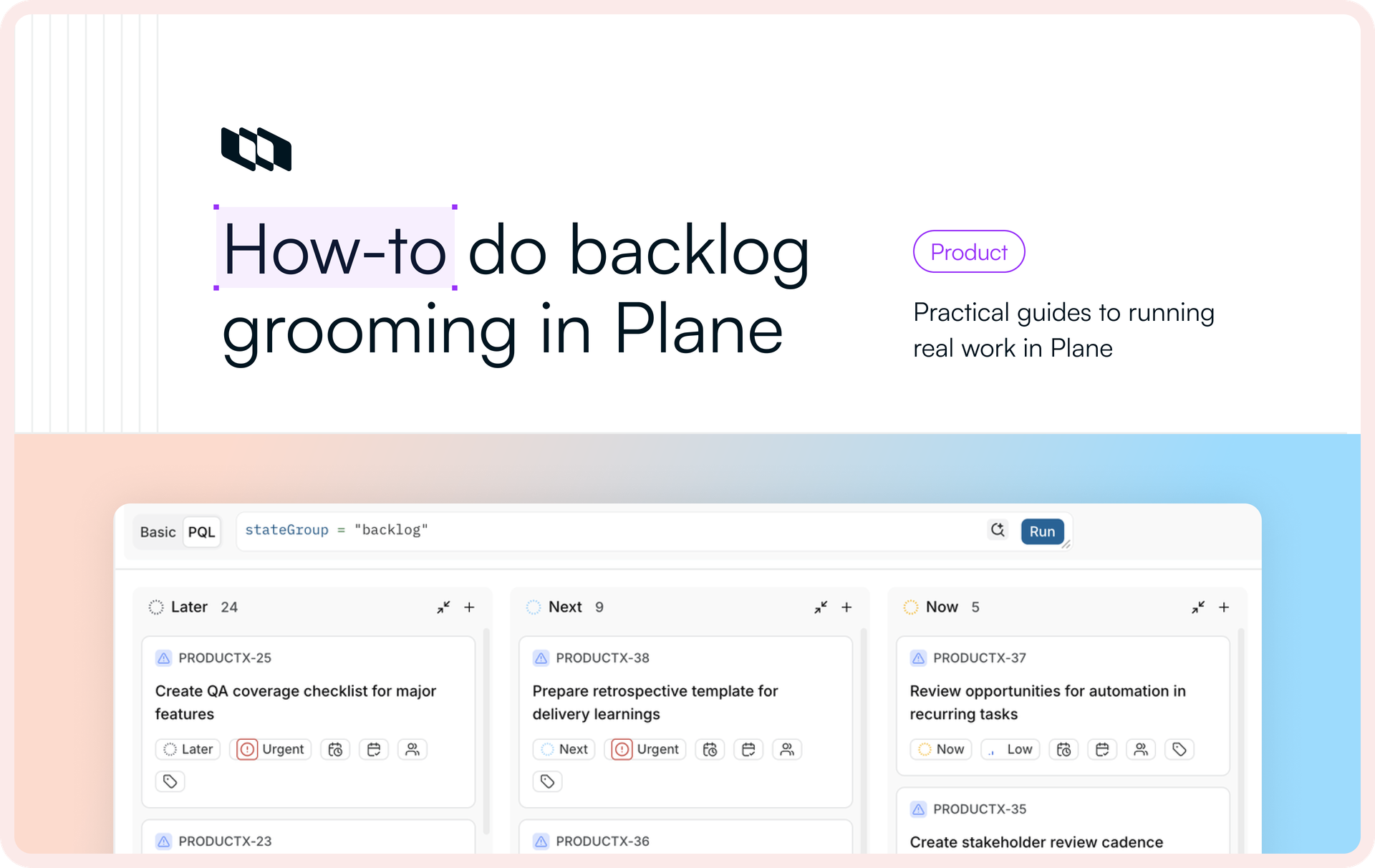
Replace a ranked list of thousands with three states and a gate. Here is the model we use in Plane and how to set it up in ten minutes.
Most backlogs try to answer “What do we do next?” by putting every item in a precise order. That works for a short list. At scale, the order becomes difficult to maintain, impossible to defend, and detached from how teams actually make commitments.
Plane uses a simpler model. Instead of deciding whether an item belongs at position 300 or 301, you decide whether it belongs in Later, Next, or Now.
The rank is the problem, not the meeting
Jira’s ranked backlog did not begin as part of its original issue tracker. The agile board and ranked backlog came from GreenHopper, a plug-in that Atlassian acquired in 2009 and integrated into a system designed to track bugs. Your most consequential product decision, the one that declares, “We do this next”, is reduced to a drag of the mouse.
Ranking creates false precision. A single ordered list implies that you can distinguish the value of item 300 from that of item 301. You cannot; neither can anyone on your team. In practice, only a handful of things matter now. The rest belong to a much larger pool of work that is not yet important enough to schedule.
Ranking also leaves little context behind. A drag records no useful explanation of who made the decision, when it was made, or why. When someone asks why one item outranks another, the team often has no defensible answer.
The model also breaks at scale. A ranked list of forty items is reviewable at a glance. A ranked list of 4,896 items is a fiction maintained by ritual. Grooming becomes maintenance on an order that no longer reflects a real decision.
Here is what that drag actually stores. Jira keeps each item's position as a string in a single, locked field called Rank, using a system called LexoRank. The rank is global: one value per issue across every board, so reordering a card on one team's board quietly reorders it on everyone else's. As you drag more, those strings get longer, and Jira runs a background job to rebalance them; past a certain length an item can stop being rankable at all.
The practical result is a meeting about vertical position. Is this the 40th most important item or the 41st? Teams rarely have that many meaningful levels of priority. They usually have three: not now, coming up, and committed. Remove the rank, and grooming becomes a much smaller decision.
The model: three states and a gate
For any item, ask one question: How committed are we to this work?
In Plane, represent the answer with three states inside the Backlog group:
- Later. Captured but not committed. These are real ideas, requests, and bugs that are not scheduled and carry no promise.
- Next. A candidate for an upcoming cycle. It is refined enough to review, challenge, and complete.
- Now. Ready to schedule. It meets your definition of ready and can enter a cycle without reopening the basic requirements discussion.
A gate controls the move from Next to Now. An item does not advance because it has drifted to the top of a list. It advances because it meets an explicit standard: a clear outcome, acceptance criteria, an estimate, a priority, and an owner.
The question changes from “Where does this sit among thousands?” to “Is this Later, Next, or Now?”
Coming from Jira
If your team uses Jira today, the concepts map cleanly. You retain the information required for planning and remove the ranking machinery.
In Jira | In Plane |
Dragging cards up and down the backlog | Moving items between Later, Next, and Now |
Global LexoRank position | State (three lanes, no ordering inside them) |
Sprint | Cycle |
Story points and estimates | Estimates |
"Backlog refinement" or "grooming" ceremony | A shorter review focused on readiness |
Set it up in Plane
You need a Plane project and administrator access to its settings.
Step 1 / Create three backlog states
Open Settings › States. In the Backlog group you already have a default state, named "Backlog." Rename it to Later, then add Next and Now. Order them with Later at the top and Now at the bottom, so the board reads in the direction of commitment. Rename the default state rather than adding another state beside it. Otherwise, you will end up with a stray fourth backlog state.
Leave the rest of the workflow alone. Your Unstarted, Started, Completed, and Cancelled states do not change. Grooming stays inside the Backlog group, while active work continues through the delivery workflow.
Three states inside the Backlog group. The rest of your workflow doesn't move.
Step 2 / Build the grooming view
Go to Views, create a view, and name it Backlog grooming. Filter it to show only backlog items with one line of PQL (Plane Query Language):
stateGroup = "backlog"
Set the layout to Board and group by State. The result is a three-column view - Later, Next, and Now - that excludes active delivery work. Save the view and add it to your favorites so that the team uses the same workspace for grooming.
Watch the shape of the funnel. A healthy backlog is wide at the bottom and narrow at the top: many items in Later, a smaller set in Next, and only as much work in Now as the team can reasonably schedule. A bloated Now column signals commitment without capacity.
One saved view, one line of PQL. Everyone grooms from the same board.
Step 3 / Write down the gate
Define “ready” once and store the definition where the team works. A Plane Page attached to the project is a suitable home.
A useful default follows:
An item can move from Next to Now when it has:
- A one-line outcome that someone who did not write it can understand
- Acceptance criteria
- An estimate
- A priority
- An owner or a named candidate
Enforce as many of these requirements as possible with work item properties. The gate should be visible in the work itself, not reconstructed from memory during every meeting. Empty required fields mean that the item is not ready.
Step 4 / Run grooming as promotion
With the board and gate in place, grooming becomes a review of one boundary: Next to Now.
- Open the Backlog grooming view.
- Start with Next and check each item against the gate. Move it to Now when it qualifies. Leave it in Next when work is still missing, and assign that work. Cancel it when it is no longer valid.
- Review Later only when Next needs new candidates. Most items in Later should remain untouched.
- Stop when Now matches the team’s available cycle capacity. The goal is not to drain the backlog; it is to keep the committed set credible.
Each move from Next to Now creates a state transition in the work item’s activity log. The team can see who made the change and when, without maintaining a separate decision record.
Every promotion is a transition on-the-record.
Step 5 / Plan the cycle from Now
When you plan a cycle, select work from Now instead of scrolling through a ranked backlog. Because each item has already passed the gate, planning can focus on sequencing and capacity rather than missing requirements.
As work begins, items leave the Backlog group and enter the delivery workflow. The next grooming pass replenishes Now from Next, while Later continues to hold work that does not yet require attention.
Plan from Now.
Bringing your Jira backlog across
If you have thousands of live issues in Jira, do not try to preserve their LexoRank order. That order is the mechanism you are replacing.
Use this import process:
- Bring every imported item into Later. The state is designed to hold a large volume of unscheduled work.
- Drop the LexoRank values. They do not provide a durable rationale worth migrating.
- Run one grooming pass to seed Next and Now. Pull forward the items that are still relevant, assess them against the gate, and stop when the committed set matches your capacity.
- Leave everything else in Later. A future pass can surface an item when new information makes it relevant.
The first pass will take longer because you are establishing the funnel. After that, the team reviews only the small set of items approaching commitment.
Where teams get this wrong
This model can quietly revert to ranking in three ways:
- Promoting on instinct. If an item reaches Now because someone argues for it rather than because it meets the gate, the team has rebuilt ranking with extra steps. The checklist is the mechanism; apply it consistently.
- Letting Now bloat. Now represents schedulable work, not a wish list. When it grows beyond what the team can deliver, it stops carrying a useful commitment signal.
- Treating Later as a chore. Later is not an overdue queue. It is a low-cost holding area, and most of it should not require regular review.
What you get
- A smaller decision surface. The team decides an item’s commitment level instead of maintaining a precise position for every request.
- Shorter grooming sessions. The meeting focuses on the boundary between candidate work and schedulable work.
- Traceable commitments. Promotions appear as state transitions with an author and a timestamp.
- A backlog that can grow without becoming a maintenance project. The unscheduled pool can remain large while the set requiring active attention stays small.
Try it in your workspace
Create the three states, build the view, and publish the gate. Use the model in your next grooming session. To adapt it to your own projects, book a demo and set it up with your team.
Recommended for you




 Download for Mac
 Download for Android